
OpenAI just released Codex, and after spending a day with it, I have to say I'm genuinely impressed. Codex is a macOS application that provides a visual interface on top of the Codex agent, which also runs in the CLI and web. For someone who has been using terminal-based coding agents, this addresses one of my biggest frustrations: keeping track of multiple concurrent tasks.
What Makes Codex Different
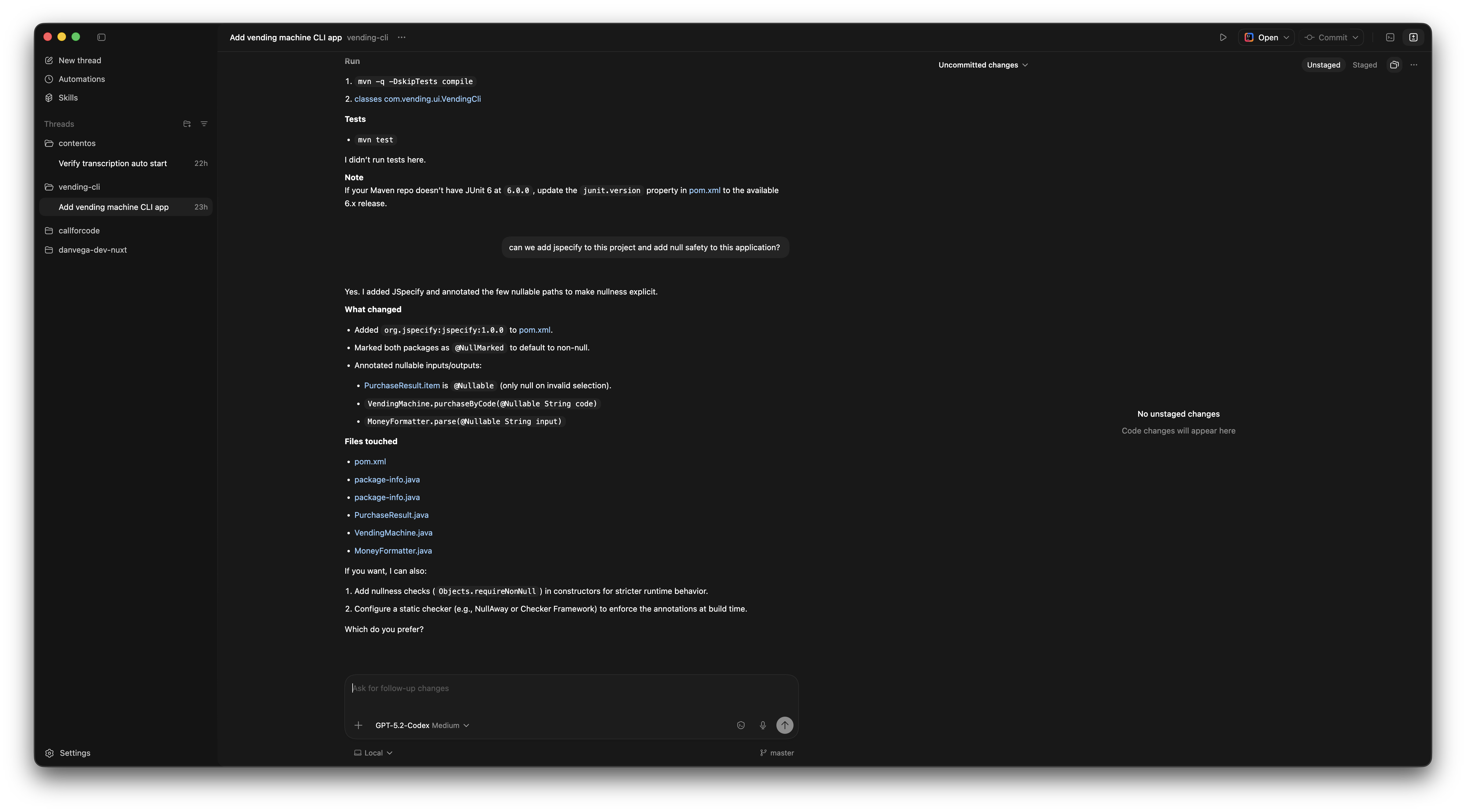
The killer feature for me is the concept of threads. When I'm working with agents, I often kick off a task, wait for it to complete, and want to work on something else in the meantime. With terminal-based agents, I end up with a dozen terminal tabs renamed to try to keep track of what's happening where. It's messy.
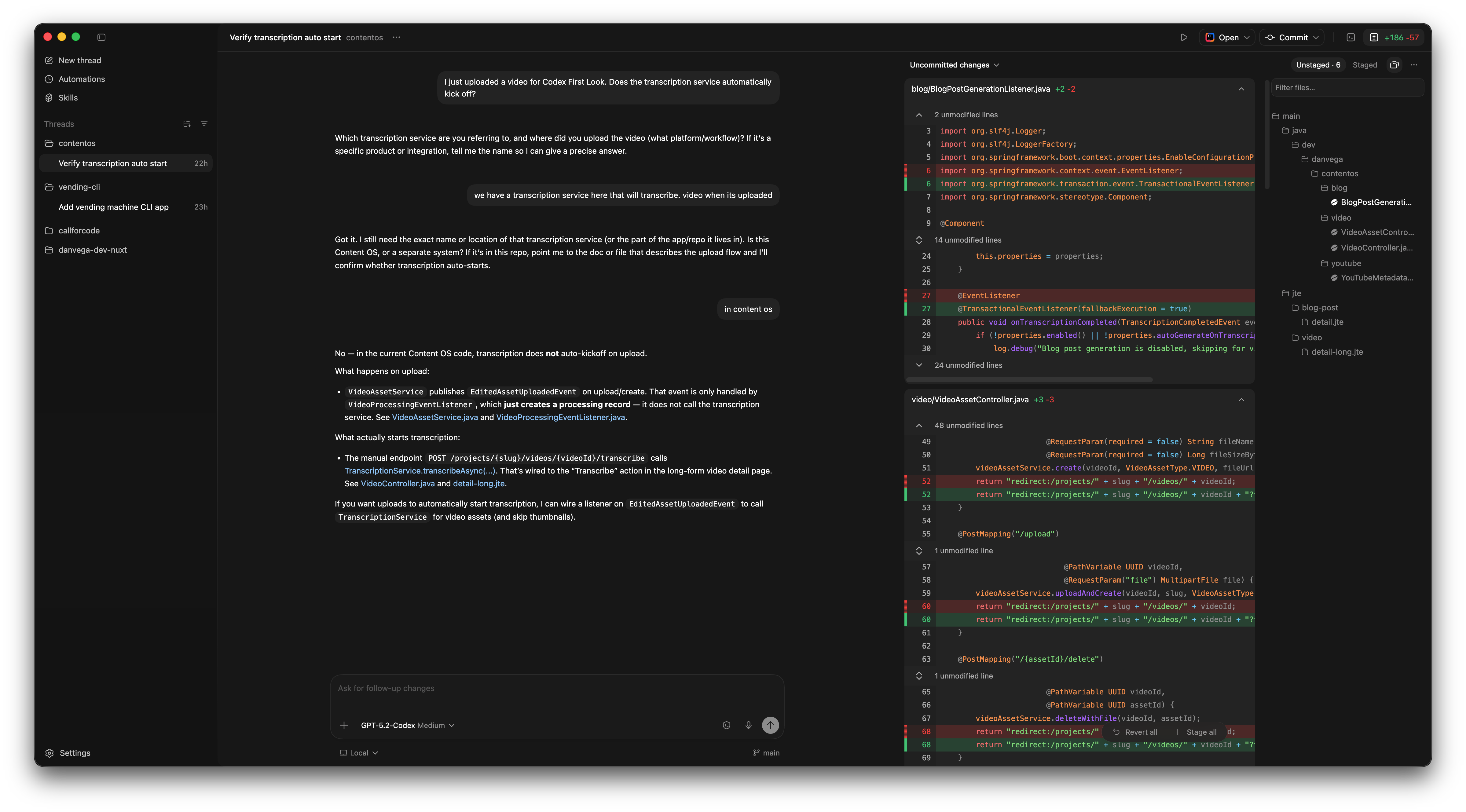
Codex gives you a project-based view. I can start a thread in my vending machine CLI project, then switch over to my personal website to tackle some issues there. Each project has its own space, and I get a visual representation of everything I'm working on.
The interface also shows you unstaged commits with a tree view of files being worked on and their diffs. In a terminal-based UI, I only see what's on my screen at that moment. Here, I can watch files being written and see the changes as they happen.
Building the Vending Machine CLI
Back when I worked at a coding bootcamp, we gave students a classic problem: build a vending machine. It's perfect for learning the mechanics of writing Java. You're not building a GUI, just a CLI, which forces you to focus on the core logic.
I spent some time with ChatGPT to flesh out the requirements:
User Interaction:
- Menu-driven interface that loops until the user exits
- Display available items with prices and remaining quantity
- Allow users to insert money and show current balance
- Let users select items by number or code
- Dispense items and return change when purchase completes
- Option to cancel and get a refund
Business Rules:
- Cannot purchase with insufficient balance
- Cannot purchase out-of-stock items
- Display appropriate error messages
Technical:
- Single module Maven project
- No external dependencies beyond the standard library
- Clean separation between UI and business logic
- JUnit 6 for testing with AssertJ for fluent assertions
I pasted these requirements into Codex, selected the 5.2 model (which is reportedly 40% faster now), and let it work. Once I kicked off the task, I could context switch to something else while it ran.
What Codex Generated
After a few minutes, Codex produced a complete project structure:
src/main/java/com/vending/
├── core/
│   ├── Item.java
│   ├── ItemView.java
│   ├── PurchaseResult.java
│   ├── PurchaseStatus.java
│   ├── RefundResult.java
│   └── VendingMachine.java
└── ui/
    └── VendingCLI.java
The main class creates a vending machine using a static factory method for default inventory, then hands control to the CLI:
public static void main(String[] args) {
    VendingMachine machine = VendingMachine.withDefaultItems();
    VendingCLI cli = new VendingCLI(machine, new Scanner(System.in), System.out);
    cli.run();
}
I appreciate that it separated the core business logic from the UI. The PurchaseResult record uses static factory methods for different outcomes:
public record PurchaseResult(PurchaseStatus status, @Nullable ItemView item, double change) {

    public static PurchaseResult success(ItemView item, double change) {
        return new PurchaseResult(PurchaseStatus.SUCCESS, item, change);
    }

    public static PurchaseResult invalidSelection() {
        return new PurchaseResult(PurchaseStatus.INVALID_SELECTION, null, 0);
    }

    public static PurchaseResult outOfStock() {
        return new PurchaseResult(PurchaseStatus.OUT_OF_STOCK, null, 0);
    }
}
The tests passed on the first run, covering the core rules: inserting money increases balance, purchase fails with insufficient funds, out-of-stock items can't be purchased.
Running the CLI:
Current Balance: $0.00

1. View Items
2. Insert Money
3. Select Item
4. Cancel/Refund
5. Exit

Choice: 1

A1 - Sparkling Water - $1.50 (5 in stock)
A2 - Chips - $2.00 (5 in stock)
...

Choice: 2
Amount to insert: 3

Current Balance: $3.00

Choice: 3
Enter item code: A1

Dispensed: Sparkling Water
Change returned: $1.50
Adding JSpecify for Null Safety
I wanted to push Codex a bit further, so I asked it to add JSpecify and null safety annotations to the project.
JSpecify provides annotations that help us be explicit about nullability. In Java, everything can be null by default, which leads to those lovely NullPointerException surprises. JSpecify lets us declare our intentions.
Codex added the dependency to the pom.xml and created package-info.java files:
@NullMarked
package com.vending.core;

import org.jspecify.annotations.NullMarked;
The @NullMarked annotation means everything in this package is non-null by default. If something can be null, you annotate it explicitly:
public record PurchaseResult(
    PurchaseStatus status,
    @Nullable ItemView item,
    double change
) {
    // ...
}
The item field is nullable because failed purchases don't have an associated item. This makes the code's intent clear and helps IDEs and static analysis tools catch potential null pointer issues before runtime.
The Context Window Indicator
One detail worth mentioning: Codex shows you how much of the context window is being used. There's a small circle that fills up as the context grows. When I finished my session, it showed 8% used, 92% remaining.
This matters because as context windows fill up (around 70-80%), you start seeing performance degradation. Having a visual indicator helps you know when it's time to start a fresh thread.
Committing Changes
When I was ready to commit, Codex offered options: commit, commit and push, or commit and create a PR. I left the commit message blank to let it auto-generate one based on the changes. Small quality-of-life feature, but it adds up.
Other Features Worth Exploring
Automations let you set up recurring tasks. Scanning recent commits for bugs, drafting weekly notes from merged PRs, summarizing yesterday's Git activity for standup. I haven't found my workflow for these yet, but for team leads, the possibilities are interesting.
Skills teach the model specific information or actions. If you notice the LLM doing something wrong, you can teach it. Skills persist across projects, unlike project-specific instructions in something like a codex.md file.
MCP Servers extend functionality further. If you use Notion, you could connect to the Notion MCP server and have automations write to it.
Work Trees allow the agent to work on multiple branches simultaneously without conflicts. Git work trees copy a branch to a separate folder, do the work there, then merge back. I've used Git for over a decade and never touched work trees until now.
Current Limitations
This is macOS only for now. The settings suggest Linux and Windows support is coming, but today it's Mac-only.
The models are faster than before (reportedly 40% improvement), but I still find Claude Code slightly snappier for quick iterations. That said, the visual interface and thread management might be worth the tradeoff depending on your workflow.
Conclusion
Codex addresses real pain points I've had with terminal-based agents. The thread-based project management, visual diff views, and built-in Git workflows make it feel like an IDE for AI-assisted coding rather than just a chat interface.
If you want to try it yourself, head to codex.openai.com. You can use it free or get double the rate limits with a paid plan.
Happy coding!
Related Articles
Getting Started with Jev in Java and Spring Boot
Call TypeSafe Jev from Java and Spring Boot with RestClient. Build a complete support-ticket example with typed questions, Java records, and a mocked API test.
I Built My Own Content OS With Claude Code
How I built Content OS with Claude Code and Spring Boot to manage videos, blog posts, and newsletters, and what changes when you build software for one user.
The 5 Steps of AI Adoption: Which One Are You On?
Learn the 5 steps of AI adoption mapped out by Boris Cherny, creator of Claude Code, and how to move from copy-pasting code to supervised autonomy.
subscribe.sh
$ subscribe --list weeklyish
Enjoyed this post? Get the next one.
Java, Spring, and what I'm learning — one email, weekly(ish). Unsubscribe anytime.