
Everyone is talking about AI agents, but what does it actually mean to build one? Not a chatbot. Not a workflow with a few LLM calls stitched together. A real agent that can reason about a goal, pick the right tools, observe results, and loop until the job is done. The Spring AI community released a library called Spring AI Agent Utils that brings Claude Code-inspired capabilities to your Spring applications, and today we're going to use it to build our own coding agent from scratch.
What Actually Makes Something an Agent?
Before we write any code, let's get clear on what "agent" means. The term gets thrown around so much it's almost lost its meaning. Here's a working definition:
A model that, given a goal, can reason about what to do next, use tools to act on the world, observe the results, and loop until the goal is complete without a human directing each step.
Think back to how we used to work with LLMs. You'd go to ChatGPT, type in a prompt, get some code back, paste it into your IDE, test it, find a problem, go back to ChatGPT, rinse and repeat. That's a lot of manual interaction. Even the early CLI tools required you to approve each step of a plan.
An agent changes this dynamic in three fundamental ways. First, it has tools that let it affect the world: searching the web, reading files, running shell commands, writing code. Second, it has autonomy, meaning it decides its next action rather than following a predefined script. Third, it can observe the results of its actions and use that feedback to decide what to do next.
Agentic Workflows vs. Autonomous Agents
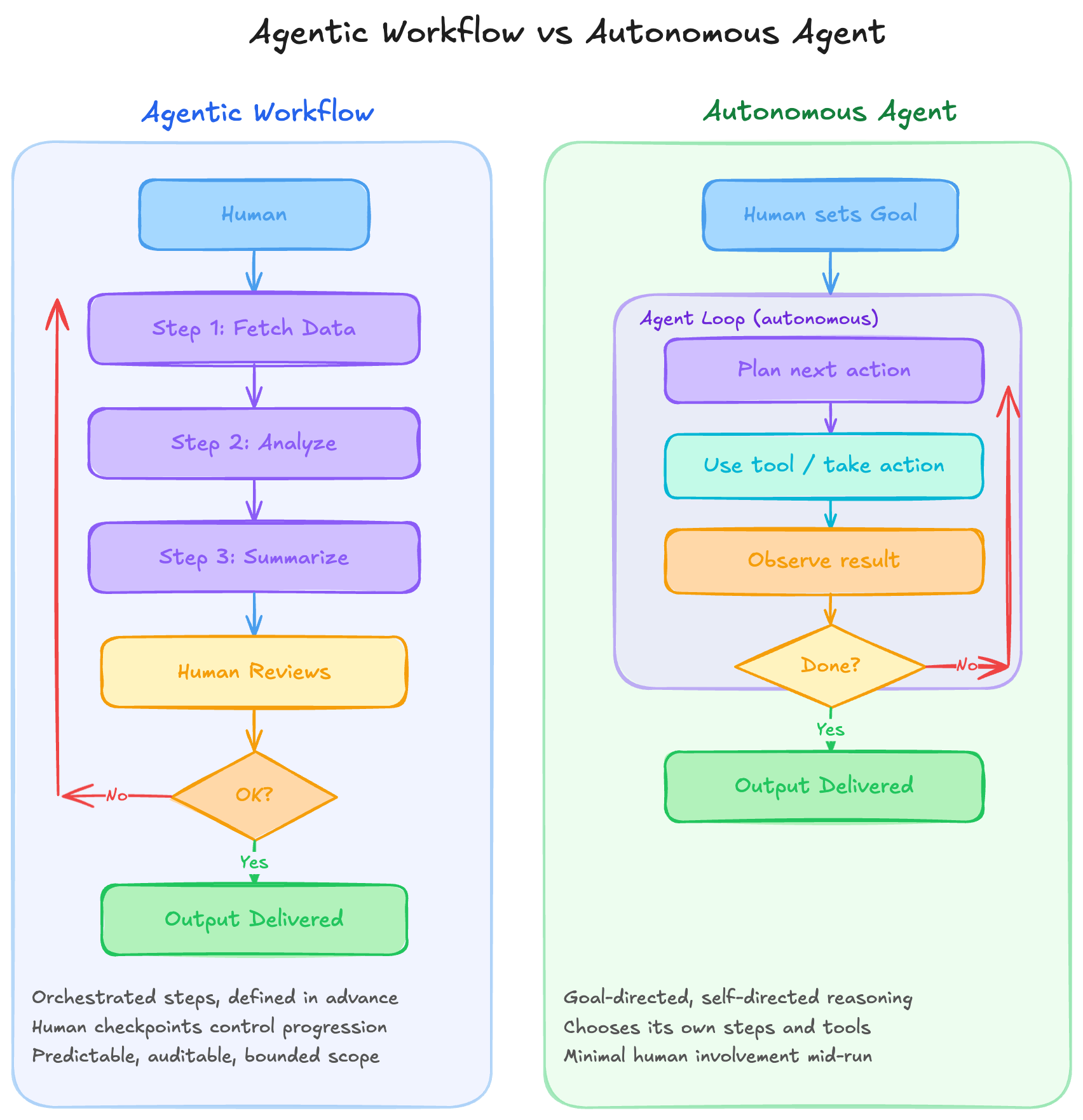
There's an important distinction worth calling out here. An agentic workflow still involves an LLM and tools, but follows a predefined set of steps. Think of a deep research pipeline: search the web, find topics, fetch data, synthesize results, generate a report. You define the steps ahead of time and the LLM fills in the gaps. That's useful, but it's not quite an agent.
An autonomous agent works differently. You set a goal ("write me a Spring Boot REST controller"), and the agent plans its next action, executes it, observes the result, and decides whether it's done or needs another step. It loops through this plan-act-observe cycle on its own until the task is complete.
Today we're building the autonomous kind.
Introducing Spring AI Agent Utils
The Spring AI Agent Utils project lives under the Spring AI Community GitHub organization. You can think of this as a collection of incubating projects that extend what you can do with Spring AI. Several members of the Spring team are actively working on projects here, including MCP Security for securing MCP servers.
Spring AI Agent Utils implements core Claude Code capabilities as Spring AI tools. It provides:
- FileSystemTools for reading, writing, and navigating files
- GrepTool for searching code content
- GlobTool for finding files by pattern
- ShellTools for running commands
- SkillsTool for reusable agent behaviors
- WebFetchTool for accessing web content
By combining these tools and giving an LLM access to them, you can build agents that autonomously complete complex coding tasks. Let's build one we'll call Sprout.
Setting Up the Project
Head over to start.spring.io and create a new project with these settings:
- Spring Boot: 4.0.x (which brings in Spring AI 2.0)
- Dependencies: Anthropic (for our LLM)
The Spring AI Agent Utils dependency isn't on the initializer yet, so we'll add it manually. Generate the project, download the zip, and open it in your IDE.
Adding the Agent Utils Dependency
Open your pom.xml and add the Spring AI Agent Utils dependency:
<dependency>
    <groupId>org.springframework.ai.community</groupId>
    <artifactId>spring-ai-agent-utils</artifactId>
    <version>0.0.2</version>
</dependency>
Configuring the Application
In application.yaml, set up your Anthropic API key and model:
spring:
  ai:
    anthropic:
      api-key: ${ANTHROPIC_API_KEY}
      chat:
        options:
          model: claude-opus-4-5-20250514
At this point the application should start up cleanly with no errors. We haven't built anything yet, but the foundation is in place.
Building the Coding Agent
Everything is going to live in our main application class. We'll start simple and layer on features as we go.
Creating the Chat Client with Tools
The ChatClient is the abstraction that lets us talk to any supported model without writing provider-specific code. If you decided to swap Anthropic for OpenAI later, you wouldn't need to change your application code.
@SpringBootApplication
public class Application {

    public static void main(String[] args) {
        SpringApplication.run(Application.class, args);
    }

    @Bean
    CommandLineRunner commandLineRunner(ChatClient.Builder builder) {
        return args -> {
            String workingDir = System.getProperty("user.dir");

            ChatClient client = builder
                .defaultSystem("""
                    You are a helpful coding assistant. You have access to tools for
                    reading files, searching code, running shell commands, and editing files.
                    Use them to help the user with their code base.
                    Working directory: %s
                    """.formatted(workingDir))
                .defaultToolCallbacks(
                    new FileSystemTools.Builder().build(),
                    new GrepTool.Builder().build(),
                    new GlobTool.Builder().build(),
                    new ShellTools.Builder().build()
                )
                .build();

            // Interactive loop coming next...
        };
    }
}
A few things to note here. The system message tells the model what it is and what it can do. We're also constraining it to a specific working directory using System.getProperty("user.dir"), which gives us the current directory where the application is running.
The defaultToolCallbacks method registers the tools our agent has access to. We're giving it file system operations, grep for searching code content, glob for finding files by pattern, and shell access for running commands.
Building the Interactive Loop
Now we need a way for users to interact with our agent. A simple Scanner-based loop does the job:
Scanner scanner = new Scanner(System.in);
System.out.println("\n🤖 Sprout coding agent at your service! Ask me anything about your code base.");

while (true) {
    System.out.print("\n> ");
    String input = scanner.nextLine();

    if ("exit".equalsIgnoreCase(input.trim())) {
        break;
    }

    try {
        String response = client.prompt()
            .user(input)
            .toolContext(Map.of("workingDirectory", System.getProperty("user.dir")))
            .call()
            .content();
        System.out.println("\n" + response);
    } catch (Exception e) {
        System.err.println("\nError: " + e.getMessage());
    }
}
The toolContext provides additional context to the tools. The working directory tells the file system tools and shell tools where to operate. When you type a question and press enter, the chat client sends it to the LLM along with the available tools, and the model decides which tools to call to answer your question.
Run the app and try asking: "What does the main application class do?" The agent will use its file system tools to read the source code, analyze it, and give you a thorough explanation.
Adding Chat Memory
There's a problem with our current setup. If you ask a follow-up question that references something from a previous exchange, the agent won't remember it. Large language model (LLM) APIs are stateless. Products like ChatGPT handle this by managing conversation history on your behalf, but our bare-bones agent doesn't have that yet.
Spring AI provides MessageWindowChatMemory for exactly this:
ChatClient client = builder
    .defaultSystem("""
        You are a helpful coding assistant. You have access to tools for
        reading files, searching code, running shell commands, and editing files.
        Use them to help the user with their code base.
        Working directory: %s
        """.formatted(workingDir))
    .defaultToolCallbacks(
        new FileSystemTools.Builder().build(),
        new GrepTool.Builder().build(),
        new GlobTool.Builder().build(),
        new ShellTools.Builder().build()
    )
    .defaultAdvisors(
            ToolCallAdvisor.builder().conversationHistoryEnabled(false).build(),
            MessageChatMemoryAdvisor.builder(MessageWindowChatMemory.builder().maxMessages(50).build()).build()
    )
    .build();
With this in place, the agent retains up to 50 messages of context. Now you can have a natural back-and-forth conversation about your codebase without repeating yourself.
Adding Skills for Reusable Agent Behaviors
Skills are one of the more interesting features of Spring AI Agent Utils. A skill is essentially a reusable description of how the agent should handle a particular type of task. Think of it as a recipe that the LLM can reference when it encounters a relevant request.
Defining a Skill
Create a directory structure in your project root:
.clod/
  skills/
    spring-boot-java/
      skill.md
Each skill lives in its own directory and contains a skill.md file. Here's a basic skill for creating Spring Boot and Java applications:
---
name: spring-boot-java-dev
description: Guidelines for creating and working with Spring Boot and Java applications
allowed_tools:
  - file_system
  - shell
  - grep
  - glob
---

# Spring Boot Java Development

When creating or modifying Spring Boot applications:

1. Follow standard Maven/Gradle project structure
2. Use proper package naming conventions
3. Apply Spring Boot best practices for REST controllers, services, and repositories
4. Include appropriate annotations (@RestController, @GetMapping, etc.)
5. Write clean, well-documented code
The YAML frontmatter is the key. The name and description help the LLM determine whether this skill is relevant to the current task. The allowed_tools field specifies which tools the skill can use. The markdown body provides the actual guidance.
Registering the Skills Tool
Add the SkillsTool to your tool callbacks:
.defaultToolCallbacks(SkillsTool.builder()
        .addSkillsDirectory(".claude/skills")
        .build())
@SpringBootApplication public class Application {
static void main(String[] args) {
    SpringApplication.run(Application.class, args);
}

@Bean
CommandLineRunner demo(ChatClient.Builder builder) {
    return args -> {
        ChatClient chatClient = builder
                .defaultSystem("""
                You are a helpful coding assistant. You have access to tools
                for reading files, searching code, running shell commands,
                and editing files. Use them to help the user with their codebase.

                Current directory: %s
                """.formatted(System.getProperty("user.dir"))) // cwd
                .defaultToolCallbacks(SkillsTool.builder()
                        .addSkillsDirectory(".claude/skills")
                        .build())
                .defaultTools(
                        FileSystemTools.builder().build(),
                        GrepTool.builder().build(),
                        GlobTool.builder().build(),
                        ShellTools.builder().build()
                )
                .defaultAdvisors(
                        ToolCallAdvisor.builder().conversationHistoryEnabled(false).build(),
                        MessageChatMemoryAdvisor.builder(MessageWindowChatMemory.builder().maxMessages(50).build()).build()
                )
                .build();

        var scanner = new Scanner(System.in);
        System.out.println("🤖 Sprout Coding Agent Ready. Ask me anything about your codebase!");

        while (true) {
            System.out.print("\n> ");
            String input = scanner.nextLine();
            if ("exit".equalsIgnoreCase(input.trim())) break;

            try {
                String response = chatClient.prompt(input)
                            .toolContext(Map.of("workingDir", System.getProperty("user.dir")))
                            .call().content();
                System.out.println("\n" + response);
            } catch (Exception e) {
                System.err.println("\n⚠️  Error: " + e.getMessage());
            }
        }
    };
}
}
Enabling Debug Logging
When you're developing and testing your agent, it's incredibly helpful to see which tools are being invoked and when skills are triggered. Add this to your application.yaml:
logging:
  level:
    org.springframework.ai: DEBUG
    org.springframework.ai.community.agent: DEBUG
With debugging enabled, you'll see log entries for every tool call the agent makes. This is where it gets interesting.
Watching the Agent Work
Let's test two different prompts to see how the agent behaves differently.
Question: "Explain how the chat memory is configured in Application.java"
When you ask this, the agent uses its file system tools to read the source file and gives you a detailed explanation. Looking at the debug logs, you'll see tool invocations for file reading and grep operations. But notice what's missing: no skill was invoked. That makes sense. Our skill is about creating Spring Boot applications, not about explaining chat memory configuration. The LLM looked at the available skills, decided none were relevant, and handled the request with just the core tools.
Task: "Create a simple HelloWorld RestController in this project"
This is where things get exciting. Now we're asking the agent to write code for a Spring Boot application. Watch the debug logs and you'll see something new:
Executing tool calls... skill starting execution of 2 skills, successful execution of skill
The agent recognized that this task matches the spring-boot-java-dev skill and invoked it. It then used the file system tools to create a new controller file, following the conventions described in the skill definition. Reload your project and you'll find a brand new HelloWorldController sitting in your source directory.
This is the power of combining tools with skills. The tools give the agent the ability to act, and the skills give it the knowledge of how to act well for specific domains.
The Complete Application
Here's what our full application class looks like with all the pieces in place:
@SpringBootApplication
public class Application {

    public static void main(String[] args) {
        SpringApplication.run(Application.class, args);
    }

    @Bean
    CommandLineRunner commandLineRunner(ChatClient.Builder builder) {
        return args -> {
            String workingDir = System.getProperty("user.dir");

            ChatClient client = builder
                .defaultSystem("""
                    You are a helpful coding assistant. You have access to tools for
                    reading files, searching code, running shell commands, and editing files.
                    Use them to help the user with their code base.
                    Working directory: %s
                    """.formatted(workingDir))
                .defaultAdvisors(MessageChatMemoryAdvisor.builder(
                    MessageWindowChatMemory.builder().maxMessages(50).build()
                ).build())
                .defaultToolCallbacks(
                    new FileSystemTools.Builder().build(),
                    new GrepTool.Builder().build(),
                    new GlobTool.Builder().build(),
                    new ShellTools.Builder().build(),
                    new SkillsTool.Builder()
                        .addSkillDirectory(".clod/skills")
                        .build()
                )
                .build();

            Scanner scanner = new Scanner(System.in);
            System.out.println("\n🤖 Sprout coding agent at your service! Ask me anything about your code base.");

            while (true) {
                System.out.print("\n> ");
                String input = scanner.nextLine();

                if ("exit".equalsIgnoreCase(input.trim())) {
                    break;
                }

                try {
                    String response = client.prompt()
                        .user(input)
                        .toolContext(Map.of("workingDirectory", workingDir))
                        .call()
                        .content();
                    System.out.println("\n" + response);
                } catch (Exception e) {
                    System.err.println("\nError: " + e.getMessage());
                }
            }
        };
    }
}
Where to Go from Here
What we built today is a starting point. A mini Claude Code running inside a Spring application. But the possibilities extend far beyond a coding assistant. Any task where you can define a goal, provide relevant tools, and let the LLM figure out the execution plan is a candidate for an agent.
Some ideas to explore next:
- More specific skills: Create detailed skills for your team's coding standards, testing practices, or deployment procedures.
- Custom tools: Build your own Spring AI tools that interact with your company's internal APIs or databases.
- Different agent types: Not every agent needs to be a coding agent. Think about agents for DevOps tasks, data analysis, or content generation.
- Goal-oriented action planning: Check out the Mbabel framework which follows a goal-oriented action planning pattern for building agents.
The Spring AI Agent Utils project is actively developing, and the Spring AI community is building more tools and skills all the time. If you're interested in agent frameworks for Spring, this is a great time to get involved.
Happy Coding!
Related Articles
Spring AI TypeSafe: Build a Model Router From Scratch
Learn Spring AI TypeSafe by building a model router from an empty app. One Choice question to Jev picks the cheapest OpenAI model tier for every prompt.
I Built My Own Content OS With Claude Code
How I built Content OS with Claude Code and Spring Boot to manage videos, blog posts, and newsletters, and what changes when you build software for one user.
Spring AI: Build Real Guardrails that hold
Learn how to build Spring AI guardrails with SafeGuardAdvisor, custom PII masking, and output rails to stop prompt injection and data leaks.
subscribe.sh
$ subscribe --list weeklyish
Enjoyed this post? Get the next one.
Java, Spring, and what I'm learning — one email, weekly(ish). Unsubscribe anytime.