
A Thankful Week, QCon San Francisco, and a Blog for Your Spring Boot App
Happy Monday and welcome to another edition of the newsletter.
It's a holiday week here in the US, and I hope you get some time to slow down. I thought this one would be short. Then I started writing. Let's get into it.
Happy Thanksgiving
Thanksgiving is this Thursday. It's always a good time for me to stop and reflect.
I'm so thankful for the role that I'm in. I'm thankful for the people I get to meet. And I'm thankful for what I get to do every single day. I get to learn new things, build things and share them with all of you. I don't take that for granted.
That includes you. Thank you for reading this newsletter, watching the videos and sending me your questions. It means a lot.
I hope you take some time this week to reflect on what you're thankful for too.
QCon San Francisco
Last week I was in San Francisco for QCon and gave two workshops:
- AI for Java Developers
- The Fundamentals of Software Engineering in the Age of AI, with Nate Schutta
Both workshops were very well attended, and we got a ton of great feedback. It was so much fun to be there.

I also got to sit in on a bunch of sessions. I saw some really interesting talks. Hats off to the organizers for a wonderful conference. I hope to be back again soon.
If you came to a workshop, thank you. I hope you left with something you can use.
New Video: Add a Blog to Your Spring Boot App
While I was in San Francisco, I recorded a video with just my iPhone and my DJI mic. No studio, no lights. It was a fun experiment, and I think it turned out great.
The video is about Beansprout. I released it last week on the plane ride out to San Francisco.
Beansprout lets you add a Markdown blog to the Spring Boot app you already run. You write posts as Markdown files. Beansprout turns them into a blog inside your app. You get an index, a page per post, tags, an archive, an Atom feed and a sitemap. Pick a theme or use your own templates. No controllers and no database.
If you've ever wanted a blog without running WordPress or Ghost next to your app, this is for you.
Check out Beansprout on GitHub
New Video: Can MCP Tools Use Spring HTTP Interfaces?
This one came out right after my last newsletter, so you may have missed it.
A lot of MCP servers are a thin layer over an API you already have. The tools take a request from an agent, call the API and hand back the result. So how should those tools call the API? In Spring, my favorite answer is an HTTP interface.
An HTTP interface is just a Java interface. You add @HttpExchange and write one method per endpoint. Spring builds the client for you. Your MCP tools call those methods and never touch RestClient directly.
@HttpExchange("/api/todos")
public interface TodoClient {

    @GetExchange
    List<Todo> findAll();

    @GetExchange("/{id}")
    Todo findById(@PathVariable Integer id);
}
In the video, I build a Spring AI MCP server that sits in front of a small REST API. Here's what I cover:
- Writing the HTTP interface and registering it with
@ImportHttpServices. - Setting the base URL in
application.yamlinstead of in code. - Writing the tools with
@McpTool, where each tool calls the interface. - Connecting Claude Code to the server and letting it use the API.
There's one gotcha that will save you some time. The MCP server starter does not include the RestClient starter. Without it, Spring Boot won't set up your HTTP interfaces. Add spring-boot-starter-restclient and you're good to go.
Spring Office Hours
What's New in IntelliJ IDEA and AIR with Anton Arhipov. After recording a podcast with Anton in Amsterdam, it was great to have him on our show too. DaShaun and I talked with him about what's new in IntelliJ IDEA 2026.3 for Java and Spring developers. We also looked at JetBrains Air and how it fits into your workflow. Anton shared a bunch of tips that will save you time every day. Listen here.
Wrap Over the Holiday Break
I'll be working on Wrap over the holiday break. I'd really like to get it out the door.
A big thank you to everyone who has been beta testing. You've sent some really good feedback, and a lot of it has already made it into the app. Here's some of what we added in the last week or so:
- Record part of the screen. Pick an area instead of the whole display.
- Export a course. Turn one long video into a set of videos, one per module.
- Bring your own audio. Drop audio files onto the timeline, and hear the sound of any clip you add.
- Bring your own takes. Recorded your screen and camera somewhere else? Wrap can combine them into one take.
- Project stats. See how long each project took and what your agents cost.
- Better blurs. Secrets that slide across the screen now get one clean blur.
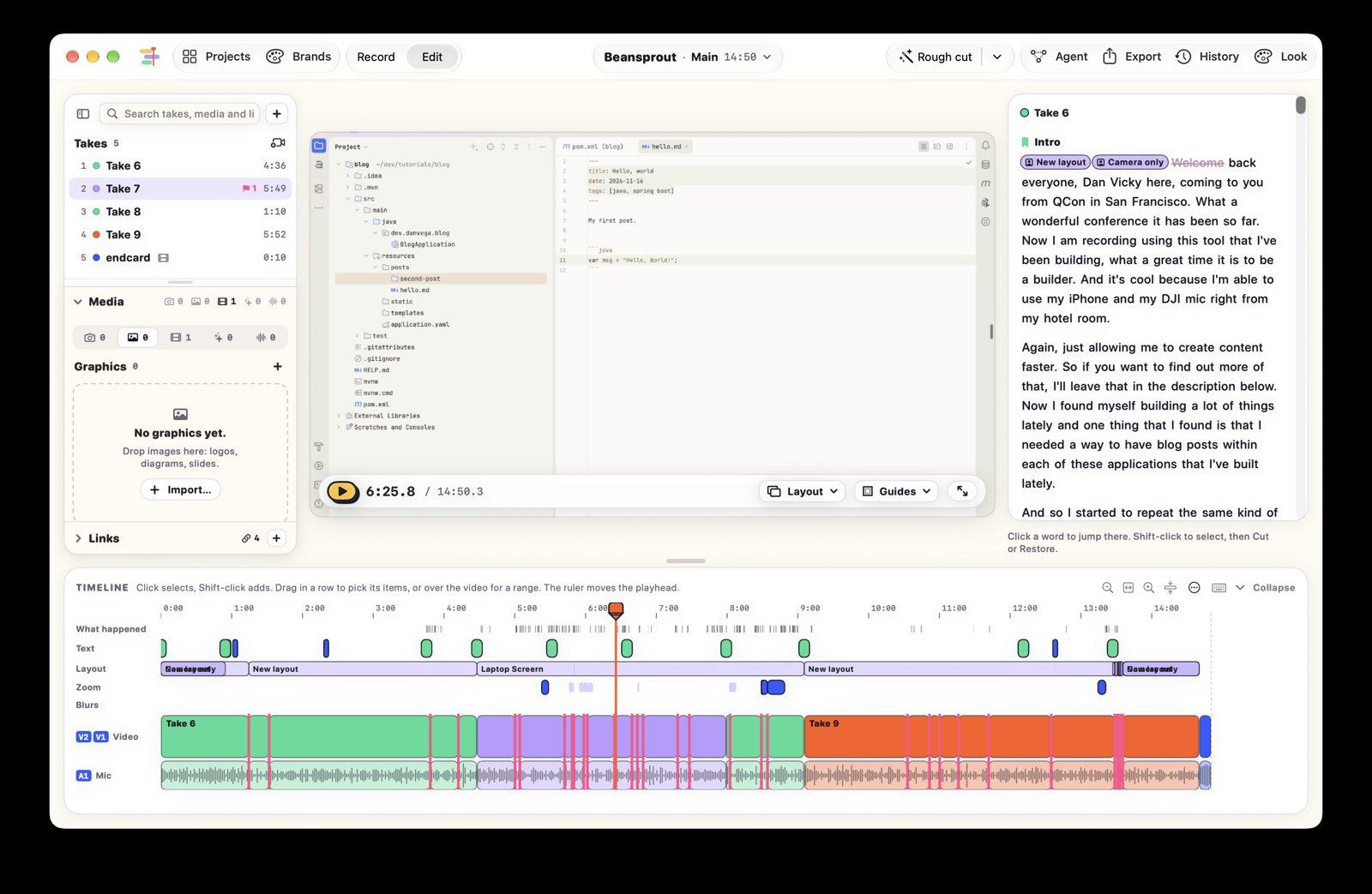
I think Wrap is in a really good place.
If you make videos about code and want to try it, join the waitlist.
Join the waitlist at thatsawrap.video
Until Next Week
That's it for this week. Happy Thanksgiving to you and your family.
I hope you enjoyed this newsletter installment, and I will talk to you in the next one. If you have any questions for me or topics you would like me to cover please feel free to reply to this email or reach out to me on Twitter.
Happy Coding,
Dan Vega
https://www.danvega.dev