
If you have ever used Claude or ChatGPT and watched that little "Calling tool..." indicator flash on screen, you have probably wondered how to build the same thing in your own app. In Spring AI 1.x that was painful because the tool-calling loop lived deep inside each chat model with no way to hook into it. Spring AI 2.0 changed that completely, and the timing is worth paying attention to since it went GA on June 12, 2026.
The big architectural shift is that the per-model tool loops are gone. In their place is a composable ToolCallingAdvisor that runs as part of the ChatClient advisor chain. That means you can finally wrap the tool-calling loop, observe it, and stream those intermediate events back to your users. Let's build exactly that.
📦 Get the Code
Follow along with the complete working example.
Why the ToolCallingAdvisor Matters
Let's start with the problem. Large language models (LLMs) do not have access to current information. If you ask one "I'm traveling to Chicago next week, what should I pack?" it has no idea what today's date is, let alone what the weather will be. To answer that question well, the model needs to make a few tool calls: one to figure out the current date (so it can calculate "next week"), one to get the weather forecast, and maybe one to look up notable city events.
Tool calling itself is not new. You could do all of this in Spring AI 1.x. The trouble was that each chat model had its own private, contained tool-calling loop buried inside the implementation. As the Spring AI team put it, agentic AI systems need a place to intercept and compose around the tool call execution loop, and 1.x gave you no way to wrap it, observe it, or swap out the execution strategy.
Spring AI 2.0 lifts that loop out of the model and into the advisor chain as a first-class, composable component. The Spring team calls this composable tool calling. Every request now runs through an ordered chain of advisors, and that same mechanism drives tool call loops, structured output, retry loops, and evaluation loops. Because it is just another advisor, you can write your own advisor that sits alongside the ToolCallingAdvisor and observes each tool call as it happens.
If you want the full background, Christian Tzolov wrote up Tool Calling in Spring AI 2.0: A Composable, Agentic Architecture, which covers the new design in detail, and the Spring AI 2.0 GA announcement covers the rest of the release.
What Are Advisors in Spring AI?
If you have not used advisors before, think of them as aspect-oriented programming (AOP) for your LLM calls. An advisor lets you run logic before and after a request flows through the ChatClient. You can inspect the request, modify it, add memory, log things, or, as we are about to do, react to events happening deep inside the tool-calling loop.
Project Setup
This is a standard Spring Boot 4.1 project. Because we are on Spring Boot 4.0 or above, the Spring Boot starter pulls in Spring AI 2.0 automatically. To create your own version from scratch you only need two things: a web starter and a model. I used Anthropic for this project, but OpenAI works exactly the same way.
The starting project brings in a few dependencies:
- Spring Boot Starter Web (MVC)
- The Anthropic model starter
- JTE (Java Template Engine) for the front end
The front end is already built in the repo. There is an index.jte with the form you saw on screen, plus a chat.js that posts messages to an /api/chat endpoint. That endpoint is the controller we are going to build.
Defining Tools with the @Tool Annotation
Before we can call tools, we need tools to call. Let's create a TravelTools class inside a tools package. We annotate it with @Component so Spring manages it for us.
@Component
public class TravelTools {

    @Tool(description = "Get today's date. Use this to resolve relative dates like 'next week' or 'tomorrow'.")
    public String getCurrentDate() {
        pause();
        LocalDate today = LocalDate.now();
        return today + " (" + today.getDayOfWeek().getDisplayName(TextStyle.FULL, Locale.ENGLISH) + ")";
    }

    @Tool(description = "Get the weather forecast for a city over a date range (dates in ISO format yyyy-MM-dd)")
    public String getWeatherForecast(String city, String startDate, String endDate) {
        pause();
        return city + ", " + startDate + " to " + endDate + ": highs 78-85°F, lows 62-68°F. "
                + "Thunderstorms likely Tuesday and Wednesday, sunny otherwise. "
                + "Windy near the lakefront (gusts 25+ mph).";
    }

    @Tool(description = "Get notable events happening in a city during a date range (dates in ISO format yyyy-MM-dd)")
    public String getCityEvents(String city, String startDate, String endDate) {
        pause();
        return "Cubs home series at Wrigley Field (3 games mid-week); "
                + "outdoor evening concert in Grant Park (bring layers, it cools off fast); "
                + "Riverwalk food festival all week.";
    }

    // Keep the "Calling..." pill on screen long enough to see during a demo
    private void pause() {
        try {
            Thread.sleep(1500);
        } catch (InterruptedException e) {
            Thread.currentThread().interrupt();
        }
    }

}
The key annotation here is @Tool. The description tells the model what the tool does. Under the hood, Spring wires this up so that when we make a call to an LLM, it sends the JSON schema for each tool. When the model decides it needs to know the current date, it sees you have a tool for that, sends the request back to your app, you call the tool, and the result goes back to the model as part of the conversation.
The getCurrentDate method is a real implementation. The weather and events methods just hardcode data to keep the demo focused. In a real application these would delegate to a service that calls an actual weather API.
Building the Chat Controller
Now for the controller. This is where the tools, the chat client, and our observing advisor all come together. Let's start with the fields.
@RestController
public class ChatController {

    private final ChatClient chatClient;
    private final TravelTools travelTools;
    private final JsonMapper jsonMapper = new JsonMapper();

    public ChatController(ChatClient.Builder builder,
                          TravelTools travelTools,
                          ChatMemory chatMemory) {
        this.chatClient = builder
                .defaultAdvisors(MessageChatMemoryAdvisor.builder(chatMemory).build())
                .build();
        this.travelTools = travelTools;
    }
}
A few things are happening here. The ChatClient.Builder is injected by Spring and is our mechanism for calling the LLM. We inject TravelTools since it is a Spring-managed component. We create a JsonMapper for serializing our events later.
We also inject ChatMemory, which Spring creates for us, and register a MessageChatMemoryAdvisor as a default advisor. Memory matters here. If you ask "what's the weather in Chicago next week?" and then follow up with "what events are going on there?", the model needs memory to understand what "there" refers to.
The Streaming Endpoint
The endpoint produces a stream of server-sent events (SSE), which is how we push tokens and tool-call events to the browser as they happen.
@PostMapping(value = "/api/chat", produces = MediaType.TEXT_EVENT_STREAM_VALUE)
public Flux<ServerSentEvent<String>> chat(@RequestBody ChatRequest request) {

    String conversationId = StringUtils.hasText(request.conversationId())
            ? request.conversationId()
            : "default";

    // ... build the event stream and stream the answer
}

record ChatRequest(String message, String conversationId) {}
The ChatRequest is a simple record we only use inside this class, so we define it right here. We produce MediaType.TEXT_EVENT_STREAM_VALUE and return a Flux<ServerSentEvent<String>> so we can emit events over time.
The conversation ID either comes from the incoming request or falls back to a default. That ID is what ties messages together in memory.
The Tool Call Observing Advisor
Here is the interesting part. We need an advisor that gets inside the ToolCallingAdvisor's recursive loop so it can see every intermediate tool call that the loop would normally hide from the outbound stream.
The trick is ordering. As long as our advisor's order is higher than the ToolCallingAdvisor's, we sit ahead of it and see those intermediate chunks. We do that by taking the default order and adding a buffer.
public class ToolCallObservingAdvisor implements CallAdvisor, StreamAdvisor {

    private final Consumer<ToolCallEvent> listener;

    public ToolCallObservingAdvisor(Consumer<ToolCallEvent> listener) {
        this.listener = listener;
    }

    @Override
    public int getOrder() {
        // Sit ahead of the ToolCallingAdvisor so we see every tool call
        return ToolCallingAdvisor.DEFAULT_ORDER + 100;
    }

    // advise the call and stream chains, emitting STARTED / COMPLETED events
    // through the listener as tool calls flow through the loop
}
The advisor implements both CallAdvisor and StreamAdvisor since we are streaming. It takes a Consumer<ToolCallEvent> called the listener. A ToolCallEvent is really just an ID, a name, and a phase, where the phase is either STARTED or COMPLETED. As tool calls flow through the advise chain, we emit those events to the listener.
You do not need to memorize the reactive internals of this advisor. The repo README breaks down the reactive bits in more detail, and honestly you can copy this advisor and use it as is.
Merging Tool Call Events into the SSE Stream
We use a small helper class, ChatEventStream, to push tool-call events from the advisor and turn them into server-sent events. It takes the JsonMapper we created earlier.
String conversationId = StringUtils.hasText(request.conversationId()) ? request.conversationId() : "default";

ChatEventStream events = new ChatEventStream(this.jsonMapper);

Flux<ServerSentEvent<String>> answerTokens = this.chatClient.prompt()
        .user(request.message())
        .tools(this.travelTools)
        .advisors(a -> a.advisors(events.observer())
                .param(ChatMemory.CONVERSATION_ID, conversationId))
        .stream()
        .content()
        .map(events::token);

return events.mergeWith(answerTokens);
Walking through this call:
prompt().user(request.message())sets the user's message.tools(travelTools)makes our tools available for this request.advisors(events.observer())plugs in our observing advisor so it can watch the tool loop.- The
paramcall passes the conversation ID into chat memory. stream().content()streams the raw text tokens back from the model.- We
mapeach token into an event for the browser.
Finally, we merge two streams into one. The events.stream() carries the tool-call events (the "Calling get_current_date..." indicators), and answerTokens carries the model's actual text response. Merging them means the browser receives both as they happen, in order.
Watching Tool Calls Stream Live
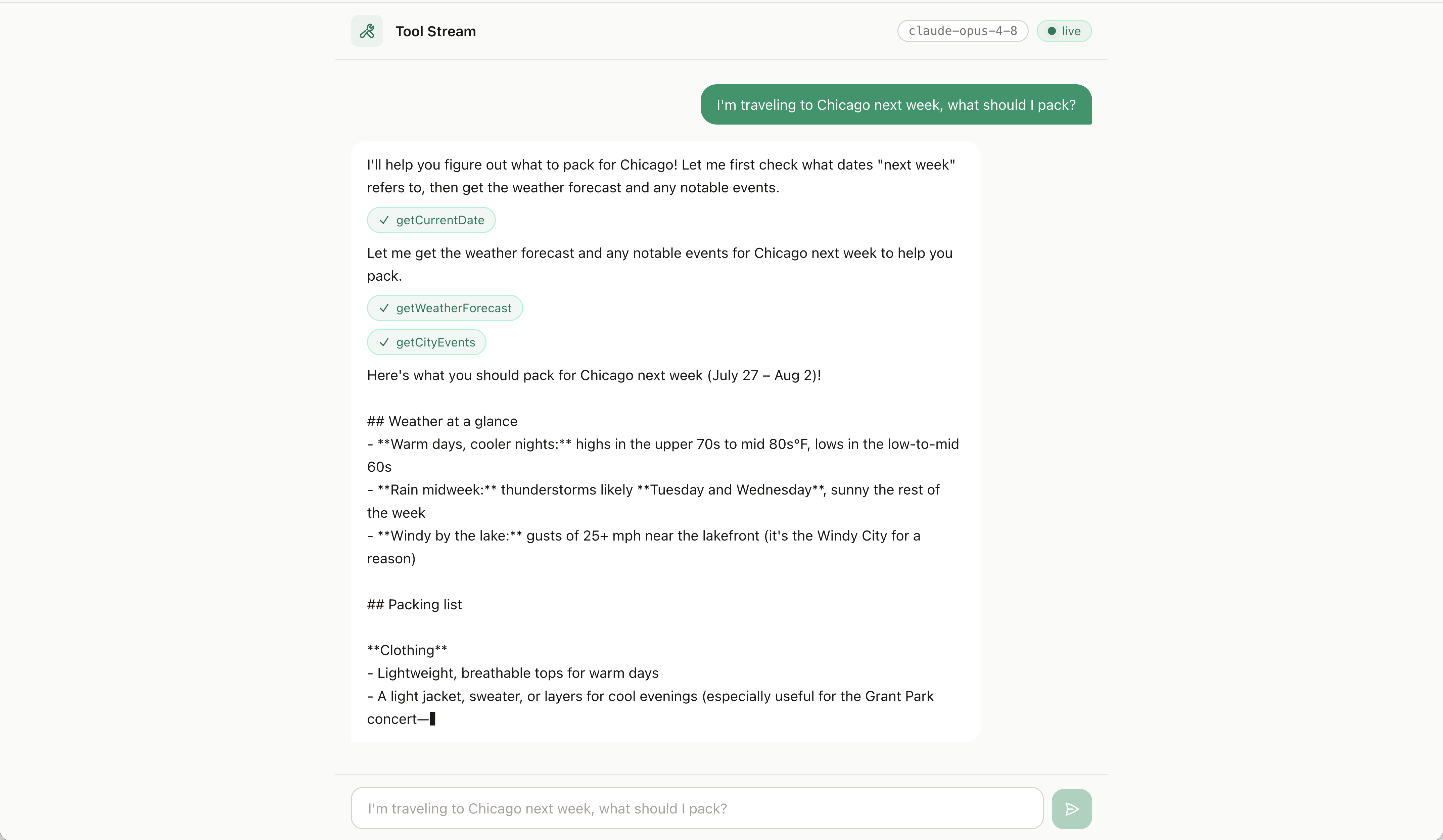
With everything wired up, restart the app and ask a question like "What's happening in Chicago next week?" This question does not require the weather tool, but it does need the current date (to figure out what "next week" means) and the city events tool.
When you hit send, you watch it unfold live. The UI shows get_current_date being called, then get_city_events, and then the model streams back its answer with all the context it needs. That real-time visibility of tool calls is exactly the experience you get from Claude and ChatGPT, and now you can build it in your own Spring app.
Wrapping Up
The ToolCallingAdvisor is one of the marquee changes in Spring AI 2.0, and it opens up a category of features that were extremely difficult before. By moving the tool-calling loop out of the individual chat models and into the advisor chain, Spring AI turned a black box into something you can observe and extend. A live tool-calling UI is just one example of what that unlocks.
If you want to try this yourself, grab the complete example on GitHub, drop in your API key, and swap in your own tools. Happy coding!
Related Articles
Spring AI TypeSafe: Build a Model Router From Scratch
Learn Spring AI TypeSafe by building a model router from an empty app. One Choice question to Jev picks the cheapest OpenAI model tier for every prompt.
I Built My Own Content OS With Claude Code
How I built Content OS with Claude Code and Spring Boot to manage videos, blog posts, and newsletters, and what changes when you build software for one user.
Spring AI: Build Real Guardrails that hold
Learn how to build Spring AI guardrails with SafeGuardAdvisor, custom PII masking, and output rails to stop prompt injection and data leaks.
subscribe.sh
$ subscribe --list weeklyish
Enjoyed this post? Get the next one.
Java, Spring, and what I'm learning — one email, weekly(ish). Unsubscribe anytime.