
I have a confession. The physical act of typing out code is not the part of this job I love most. I love solving problems. I love building things. For years I had a folder full of app ideas I never touched. Building them would have taken time away from everything else in my life. Claude Code helped me turn one of those ideas into personal software I actually use.
This is the story of one of those apps. I call it Content OS, and it now runs every video, blog post, and newsletter I publish. I built it over eight months with Claude Code doing most of the typing. A year ago it would have stayed a half-finished idea. Today it is the tool I open every morning.
Content OS is a private tool built around my workflow. This is a tour of what I built and why, rather than a project for you to clone.
The App I Could Never Justify Building
For a long time I managed my content by stitching tools together. I love Notion, so I tracked my content calendar and procedures there. I used Gmail and Google Calendar and GitHub to track talks and abstracts. It worked, sort of, but it was a pile of separate pieces held together with willpower.
Could I have built a single app to replace all of that? Probably. But it would have taken me a long, long time. And to justify that much time, I would have needed a reason. Maybe I would have to sell it. Maybe it would need to serve other people. That reason never existed, so the project never happened.
AI changed the math. I could finally build software that fits the exact way I like to work, without turning it into a product. That is the real point of this post. AI did not just speed up a project I was already doing. It made a project exist that otherwise never would have.
Stakes, Scale, and Scope
Before I show you what it does, I want to share the mindset that made this possible. When you build personal software, three things get much smaller: stakes, scale, and scope.
The stakes here are low. I am building this for me. The scale is exactly one user. I never have to scale it out. The scope is my workflow and nobody else's. I can skip multi-tenant features, public onboarding, and the effort of supporting everyone else's workflow. Credentials, backups, and the actions that publish to my accounts still need care. One user changes the scope; it does not make mistakes cost-free.
That freedom is huge. I can move fast. I still read the important code, but I do not agonize over every decision the way I would for something I was shipping to the public. If you have been holding back on a personal tool because it needs to be perfect, this is your permission to stop.
The Stack Behind Content OS
I built this on tools I already know. That gives me a way to judge the code the agent produces. Here is what is under the hood.
- Java 25
- Spring Boot 4
- Spring AI for every AI integration in the app
- Java Template Engine (JTE) for server-rendered templates
- PostgreSQL with Flyway for migrations
- Spring Data JDBC for data access through Java Database Connectivity (JDBC)
MCP stands for Model Context Protocol. I will come back to it later, because the MCP server is the part that still feels a little wild to me.
There is nothing exotic here. It is a normal Spring Boot app with a lot of packages. At the time I recorded the tour, I counted around 80,000 lines of code across 310 commits. I started in January and it is now September. It has just been a lot of fun to iterate on.
Everything Starts With an Idea
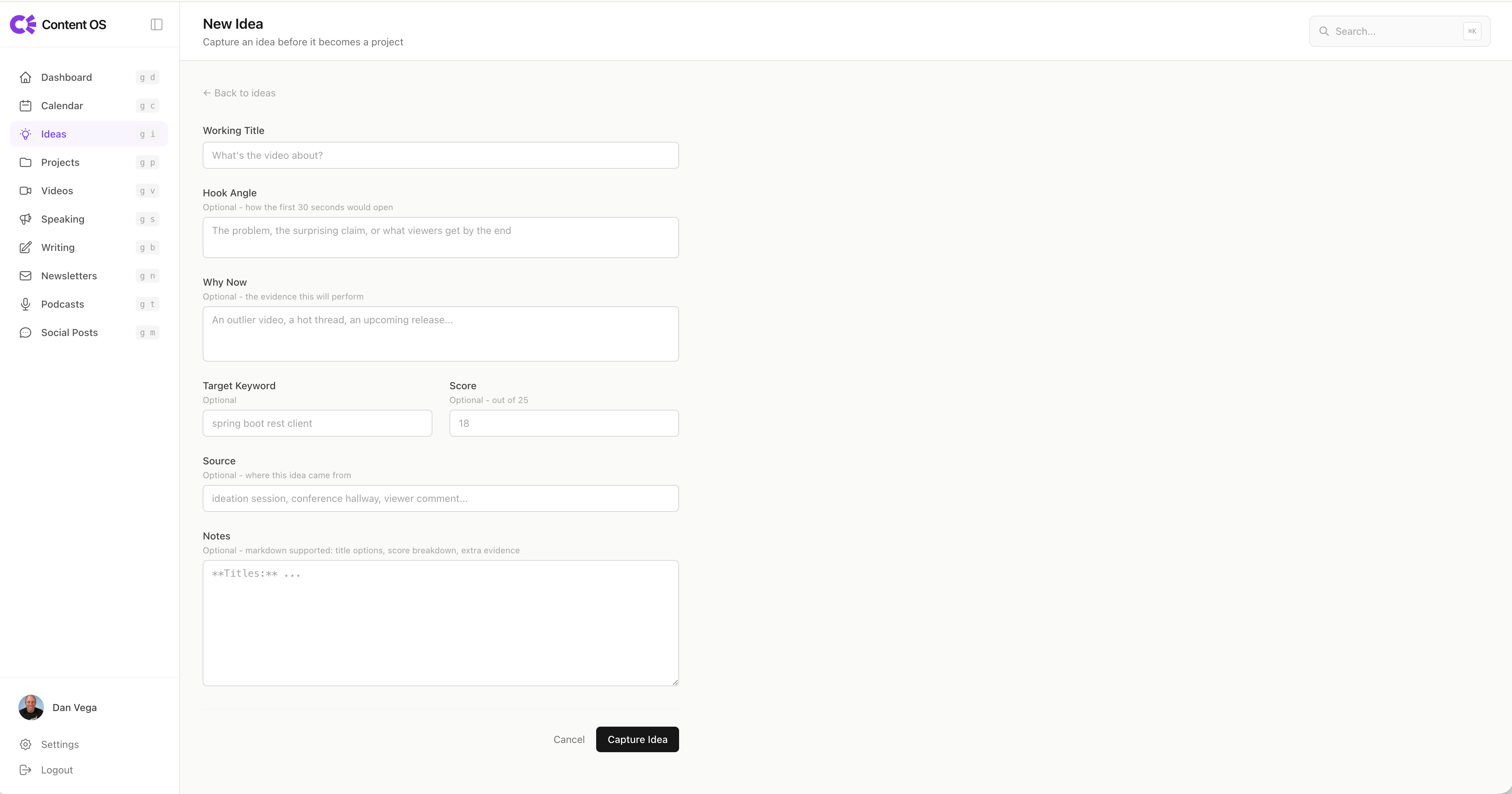
Every piece of content starts with an idea. I might see a new feature drop or a tool release, and I jot it down before it disappears. An idea has a working title, a hook, a "why now," some keywords, sources, and notes. That is it. An idea is raw. It is not yet something I have committed to.
When an idea is worth pursuing, I promote it to a project. Projects live on a Kanban board that runs from pre-production to production to distribution to done. There is also a list view when I want a flatter picture.
This distinction matters. A project is bigger than a video. One project might produce a long-form video, several shorts, a blog post, and a handful of social posts. The idea is the seed. The project is the tree.
A Content Creation Workflow From Idea to Newsletter
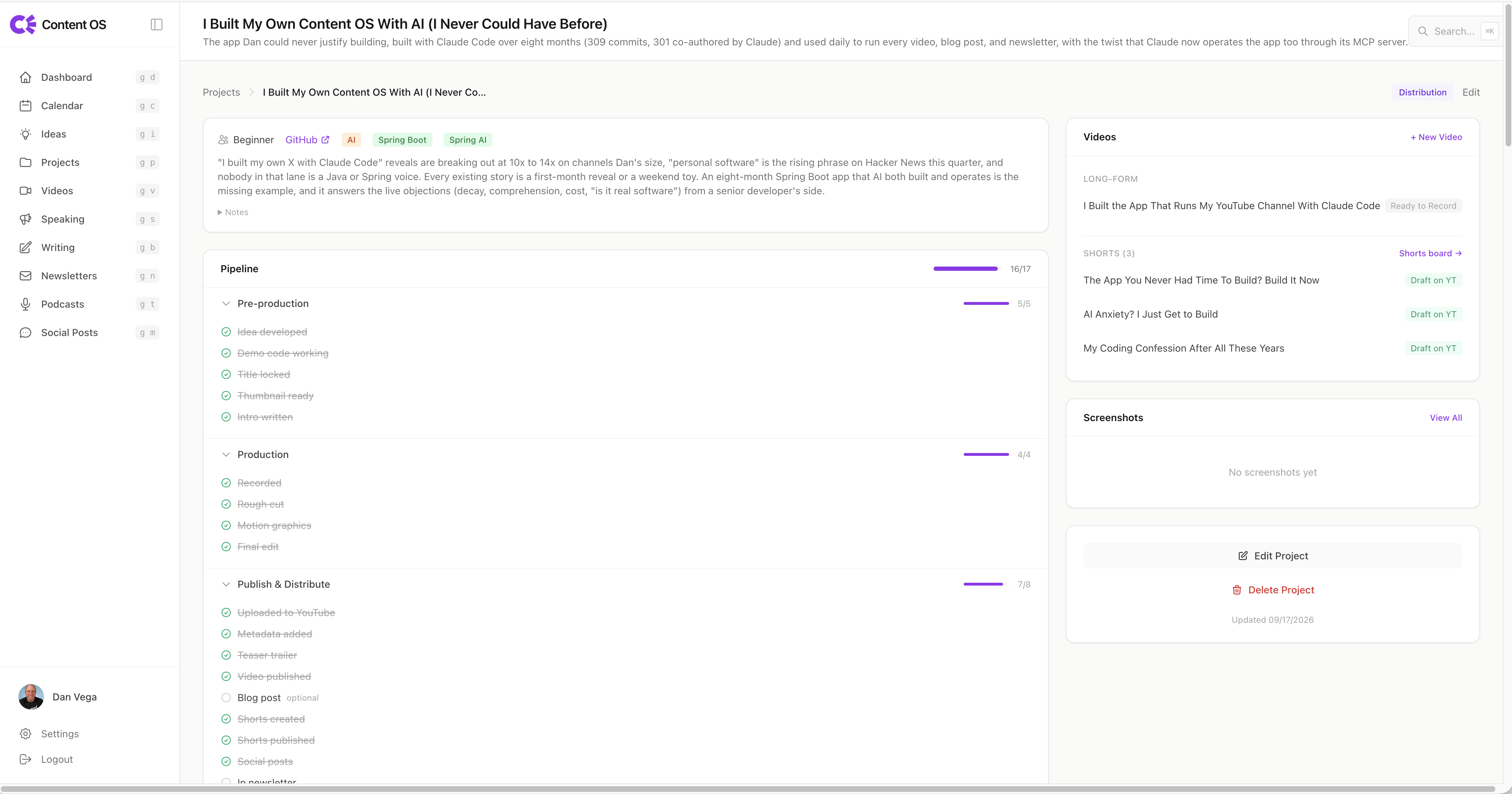
Inside each project is a pipeline, and this is where the app earns its keep. The pipeline is a checklist that tells me exactly where I am in the process of creating a piece of content.
Pre-production comes first. The recording gate checks that the title, thumbnail, and intro are ready. I develop the idea into a brief. I check whether there is demo code and whether that code actually works. I usually write the code before I commit to a video, so I know the topic is worth doing.
For a YouTube video, pre-production also means locking in a title, getting a thumbnail ready, and writing a hook. These are things I used to leave until after recording, which was always painful. Doing them up front changes the whole feel of the process.
Then comes production. I record, then do a rough cut, motion graphics, and a final edit. The rough cut used to be slow and manual. Now I lean on skills that chop up the footage, cut silences, and remove retakes to give me a starting point. I still finish in Premiere Pro, but I spend far less time there.
Turning a Transcript Into Metadata, a Blog Post, and Social Posts
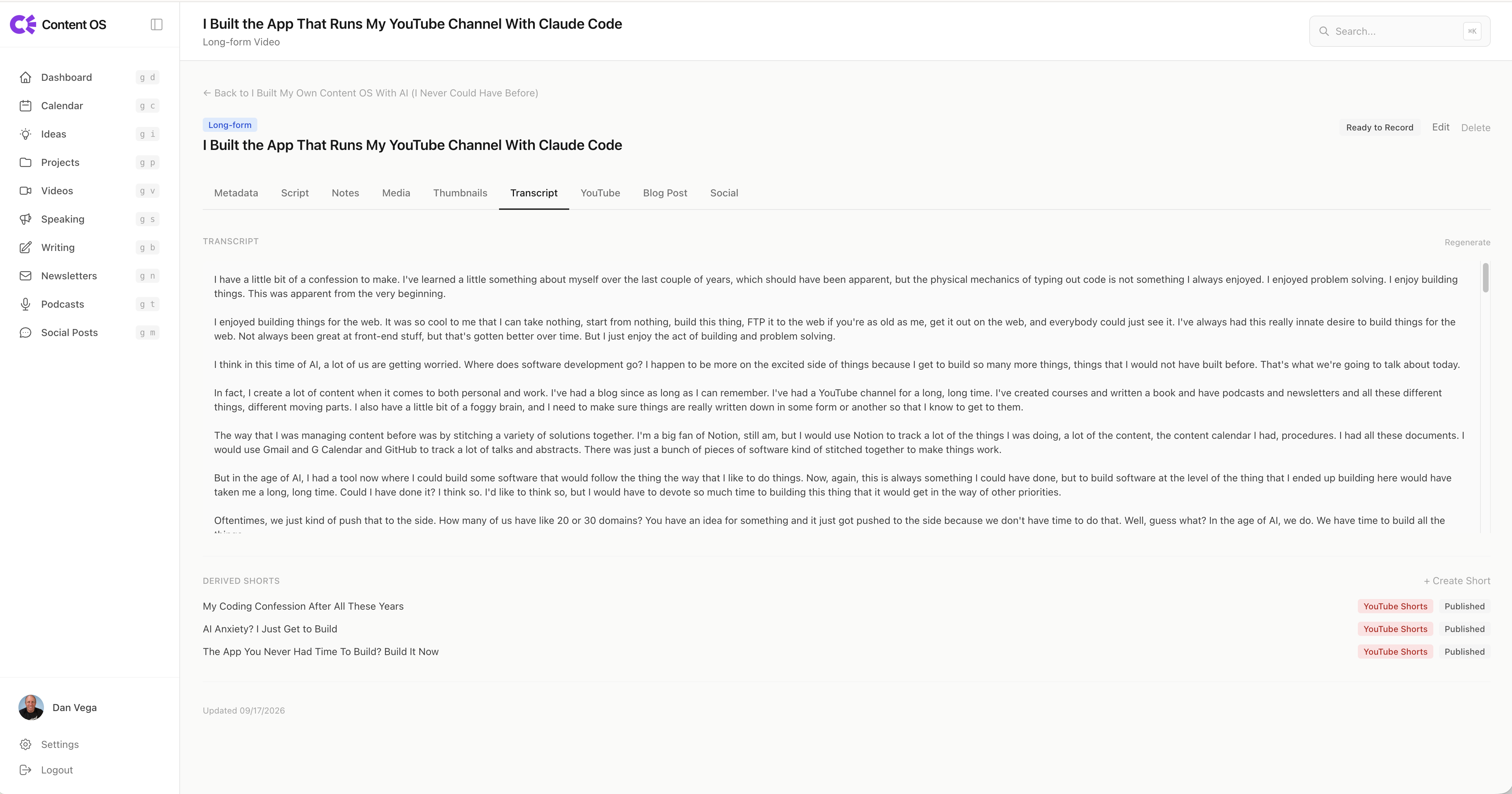
When I upload a final edit, the app kicks off a transcript using Spring AI under the hood. The transcript is the source of truth for almost everything that follows.
From that transcript, I can ask AI for help with the video title and description. This used to be a chain of manual steps. I would run a separate transcription tool, copy the text, paste it into an AI chat, generate titles and descriptions, then paste those into YouTube. Now it happens in one place.
The transcript also powers the blog post. I am not asking AI to invent an article. I am asking it to take my transcript, the code I wrote, and my notes, then generate a rough draft that acts as a companion to the video. You are reading exactly that kind of companion post right now, on danvega.dev. I still edit and shape it, but I never start from a blank page.
Social posts work the same way. When a video is done, I draft and schedule announcements across Bluesky, LinkedIn, and X. Each platform needs its own version, which I review before scheduling. Posts for X and Bluesky stay short. LinkedIn posts run longer and lean into engagement. Spacing the posts out over time matters, because people are not all on social media the moment I hit publish.
The Shorts Board, the Newsletter, and Everything in Between
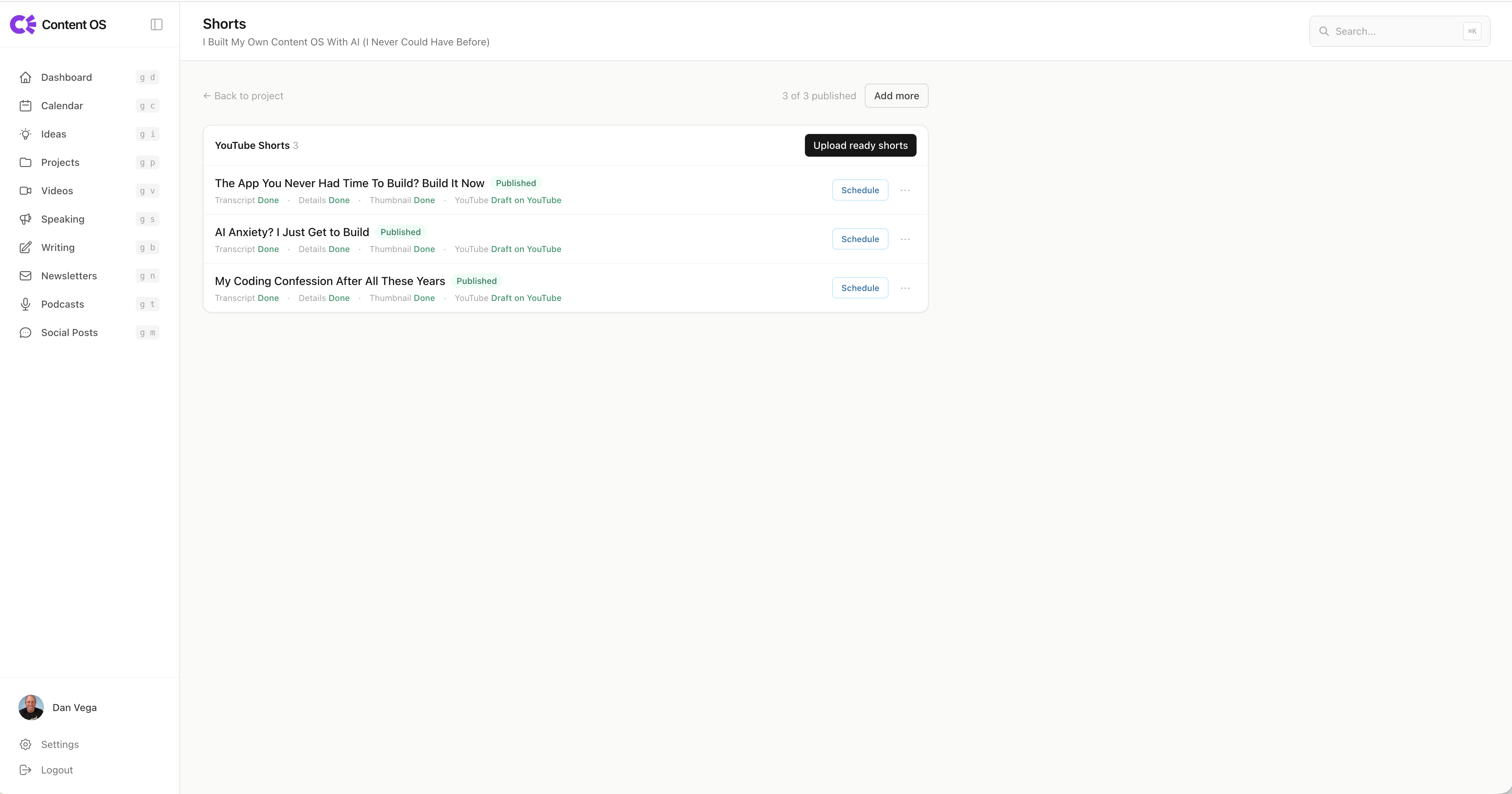
The final video also feeds a shorts board. A skill chops the long-form video into clips, and the board tracks which shorts exist and where they still need to go. I can mark whether social posts went out for each one.
Every Monday I write my newsletter on Beehiiv, which has an API I hook into. The pipeline reminds me whether a given piece of content made it into the newsletter yet. That gives me a place to check what still needs to be included.
Content OS also tracks the rest of my work. I keep speaking engagements and Call for Proposals (CFP) submissions here, so I always know which abstract I sent to which conference. That abstract is a living document, since a talk on Spring AI can shift a lot over a year. I track my podcasts through the Transistor API, my guest appearances, and my calendar of every content type at once.
The MCP Server: When AI Runs the App It Built
Here is the part that still feels a little scary. Claude did not just build this app. It can operate it too.
Using Spring AI's MCP support, I exposed a server with a set of tools. That means I can connect the app to an agent like Claude Code and ask it to do real work inside Content OS from my terminal. I can say something like "I have an idea for a video on structured concurrency in the next JDK, save it as an idea, then promote it to a project." The agent calls the right tools and it happens.
It turns the app into a personal assistant. Instead of clicking through forms, I describe what I want and the agent handles the busywork. Building the app was step one. Letting an agent drive it was the step that changed how I actually use it day to day.
Start With the Friction You Already Have
I would not start by copying this entire app. I built it over months because I already knew which parts of my process were painful. A new tool still creates work: reviewing changes, fixing bugs, and keeping it running.
Write down the workflow first. My earlier content creation workflow post walks through that exercise. Pick one step where a small tool would help, then use it long enough to discover what is missing.
It also helps to work in a stack you understand. I can inspect a Spring application and challenge the generated code. I wrote more about that distinction in Can You Trust AI-Generated Code?.
Why I Am Excited to Be a Builder Right Now
There is a lot of anxiety in software right now. People worry about what these tools replace and where all of this goes. I understand the worry, but I land on the excited side.
I get to build. Content OS is one example, but I have a whole set of personal tools like this that I never share with anyone. They exist only because AI removed the cost that used to keep them stuck in a folder of "someday" ideas.
If you take one thing from this post, let it be this. Stop worrying about whether your tool is good enough for everyone else. Build the thing that works for you. The scope of one is a gift, not a limitation. We live in a moment where you can finally build all the things you kept pushing aside.
So go build something for yourself. Something small, something opinionated, something that fits your brain exactly. I hope this gave you a little inspiration to start.
Happy Coding
Dan
Related Articles
Spec-Driven Development for Solo Developers: My Plan
Spec-driven development without the team process. The lightweight plan I use as a solo developer, from one PRODUCT.md to a retro, on a Spring Boot Stripe store.
Spring AI TypeSafe: Build a Model Router From Scratch
Learn Spring AI TypeSafe by building a model router from an empty app. One Choice question to Jev picks the cheapest OpenAI model tier for every prompt.
Getting Started with Jev in Java and Spring Boot
Call TypeSafe Jev from Java and Spring Boot with RestClient. Build a complete support-ticket example with typed questions, Java records, and a mocked API test.
subscribe.sh
$ subscribe --list weeklyish
Enjoyed this post? Get the next one.
Java, Spring, and what I'm learning — one email, weekly(ish). Unsubscribe anytime.