
Yesterday I caught my AI assistant making three mistakes in a Spring Boot app I have been writing for years. An hour later, it handed me Swift code I had no business approving, and I shipped it anyway. Same model. Same day. Two completely opposite reactions. The one I should trust less is the one that felt better.
That gap is the whole problem. We are all reaching for coding assistants now, and the question we keep dodging is simple. Can you trust AI-generated code? The honest answer is that it depends on what you already know.
Two Code Bases, One Assistant, Opposite Reactions
I was working on a Spring Boot code base I know pretty well. I asked one of my favorite coding agents to make a small change. The code compiled. Everything looked fine at a glance. But when I read it carefully, I found problems. It pulled in dependencies I did not need. It used mutable types where an immutable one belonged. It wrote a test that technically passed but did not test the thing I actually asked for.
I fixed it and moved on. These tools still have a way to go, I thought.
Later that same day, I was building my first iOS app. I use a coding assistant for almost everything there because I am new to it. I asked for a feature and the code looked amazing. Clean, idiomatic, it compiled, it worked. I closed the tab feeling like I had been handed a gift.
Here is what has been bothering me since. I have no idea if that Swift code was any good. I do not know if a senior iOS developer would flag it on sight. I know it ran. That is a very different thing from knowing it is right.
The reaction I should trust less is the one that felt better. When you cannot tell good code from bad code in a given ecosystem, you ship things you do not understand. You build on patterns that will break. You learn the wrong lesson from a tool you trusted too much.
Building a Spring Boot App With an AI Agent
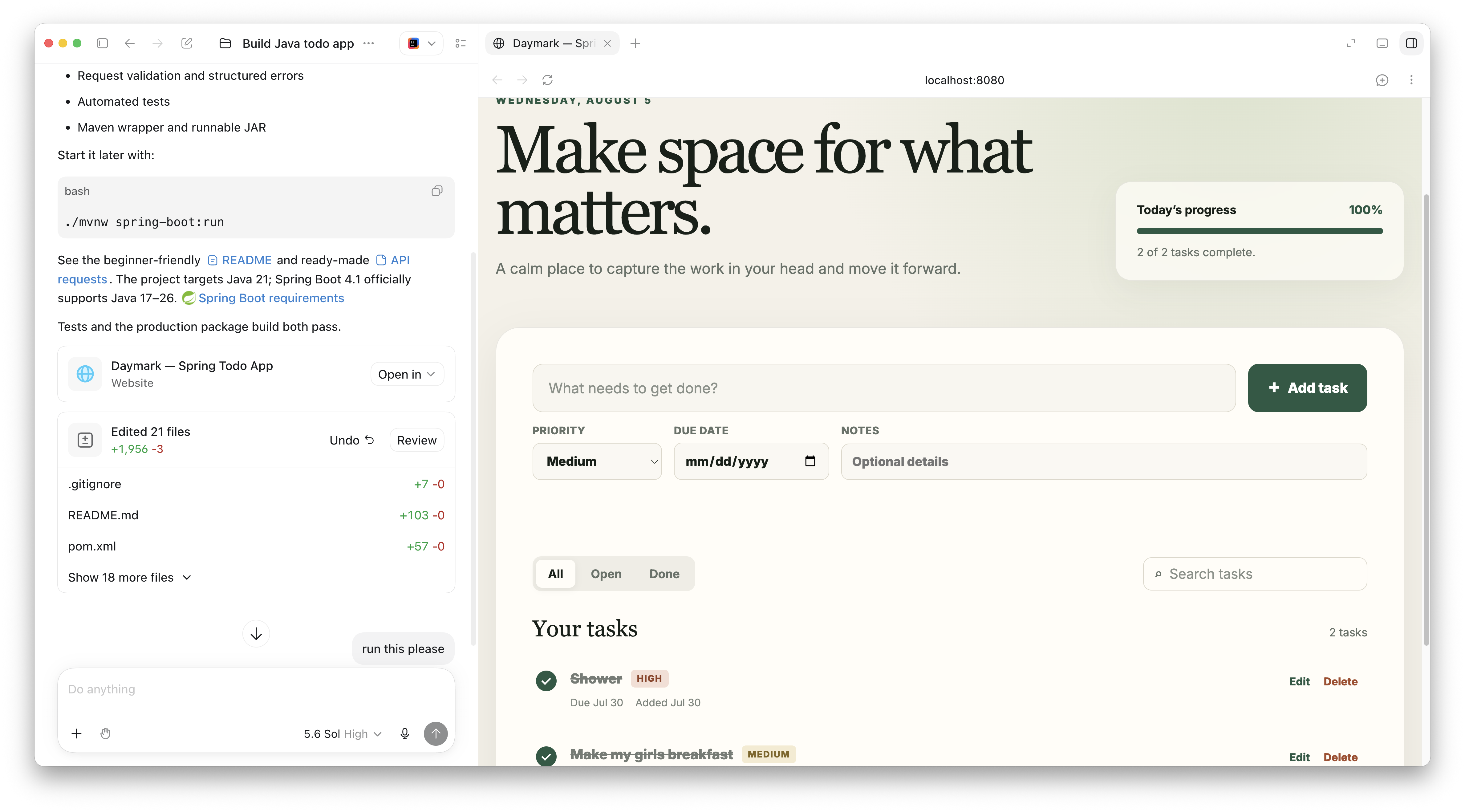
Let me show you the first example. I started in a coding agent with a simple prompt: I am new to Java, build me a full to-do app with a REST API backed by a database. Nothing more detailed than that.
About nine minutes later I had a complete Java to-do app running on localhost 8080. It used Spring Boot 4.1, an H2 database, and gave me create, edit, complete, search, filter, and delete features. There was a responsive browser interface, some validation, error handling, automated tests, a Maven wrapper, and a runnable jar.
From a user standpoint, this was a great starting point. The UI looked better than something I would have thrown together. If this is an MVP to show a client, it works great.
But here is the trap. If you do not know what you are looking for, and it compiles and runs, then everything must be fine, right? Let us actually read the code.
Reading the Dependencies: JPA vs JDBC and Spring Boot 4
The first thing I check is the dependencies. What did we pull in?
Spring Boot 4.1 is a good start. It used JDK 21. I might reach for something newer like JDK 25, especially for an app talking to a database, so I can take advantage of virtual threads and later fixes. So I would bump that up.
Then I see Spring Boot Starter Data JPA. There is nothing wrong with JPA. But JPA (Java Persistence API) hides a lot of complexity. If you do not know how to debug Hibernate issues, you will hit a wall the moment something goes wrong. For a beginner, I would reach for Spring Boot Starter Data JDBC instead. It is simpler, and you avoid a whole class of hard debugging problems.
That choice has a real downstream effect. Because the app uses JPA, the agent had to use classes for the entities.
// With JPA you are stuck with a class and a no-arg constructor
@Entity
public class Todo {
    @Id
    @GeneratedValue
    private Long id;
    private String title;
    private boolean completed;
    private Priority priority;

    protected Todo() {} // JPA needs this
    // getters and setters...
}
JPA needs that no-argument constructor, so you cannot use a Java record here. With Spring Data JDBC, you can. Records give you immutability for free, which matters more than people think.
The H2 Console Problem in Spring Boot 4
Here is one only a Spring developer would catch. The project included the H2 database and referenced the H2 console. But in the editor, the console configuration showed unresolved references.
In Spring Boot 3, including the H2 dependency was often enough. A large auto-configuration jar would wire up the H2 console for you. Spring Boot 4 introduced modularization. Now if you want the H2 console, you need to include that dependency explicitly. It will not get picked up for free anymore.
So if you launched this app and visited /h2-console, you would not see the console at all. The agent wrote code that looked right for Spring Boot 3 but was wrong for Spring Boot 4. You only catch that if you know the version differences.
A REST Endpoint That Uses the Database as a Dumb File
Now look at the controller and the query behind it.
@GetMapping
public List<Todo> findAll(
        @RequestParam(required = false) Boolean completed,
        @RequestParam(required = false) String search) {
    // loads every todo, then filters in memory
    return todoService.findAll(completed, search);
}
This works. But it loads every to-do from the database, then filters by search text with a Java stream. Nothing is paginated. The database, which is excellent at searching, is being used as a dumb file.
With a handful of records, no problem. With thousands of rows, you do not want to load all of them into memory and then filter. This is where you would push the filtering into the query and add pagination.
Custom Error Handling vs Spring's ProblemDetail
The app included a global exception handler, which is good. But it used a hand-rolled ApiError record to represent errors.
Spring already solves this with ProblemDetail. It is a representation for RFC 9457 (the Problem Details for HTTP APIs standard). It gives you spec-defined properties plus a map for your own non-standard fields.
@ExceptionHandler(TodoNotFoundException.class)
public ProblemDetail handleNotFound(TodoNotFoundException ex) {
    return ProblemDetail.forStatusAndDetail(
            HttpStatus.NOT_FOUND, ex.getMessage());
}
The custom error class is not broken. It just reinvents something Spring gives you out of the box, in a standard format other tools already understand.
The Test That Passes But Does Not Test the Thing
There was one test, and it was a @SpringBootTest. That loads the entire application context. In a small app, fine. In a large app with thousands of components, you probably want a slice test that loads only what you need.
More important, one test is not enough. I would want unit tests on the controller, tests on the service, and maybe an end-to-end test since there is a UI involved. A test that asserts the app starts is very different from a test that proves your endpoint returns the right data in the right order.
A few other things I would add before this ever went to production:
- Schema management with Flyway or Liquibase. There was no way to manage the database schema over time. Even as a solo developer, you want your schema versioned like your code. On a team, this becomes a real problem fast.
- A production-like database. The app used a file-based H2 database. I prefer to shift left and run something closer to production, like Postgres via Docker Compose, so local matches prod.
None of these are dramatic failures. They are the difference between "it runs" and "it survives production."
Now Flip It: An iOS App in a Stack I Do Not Know
I have an eye for the Spring problems because I have years of experience there. I do not have that for iOS. None. So let us watch what happens when I build in a stack I do not understand.
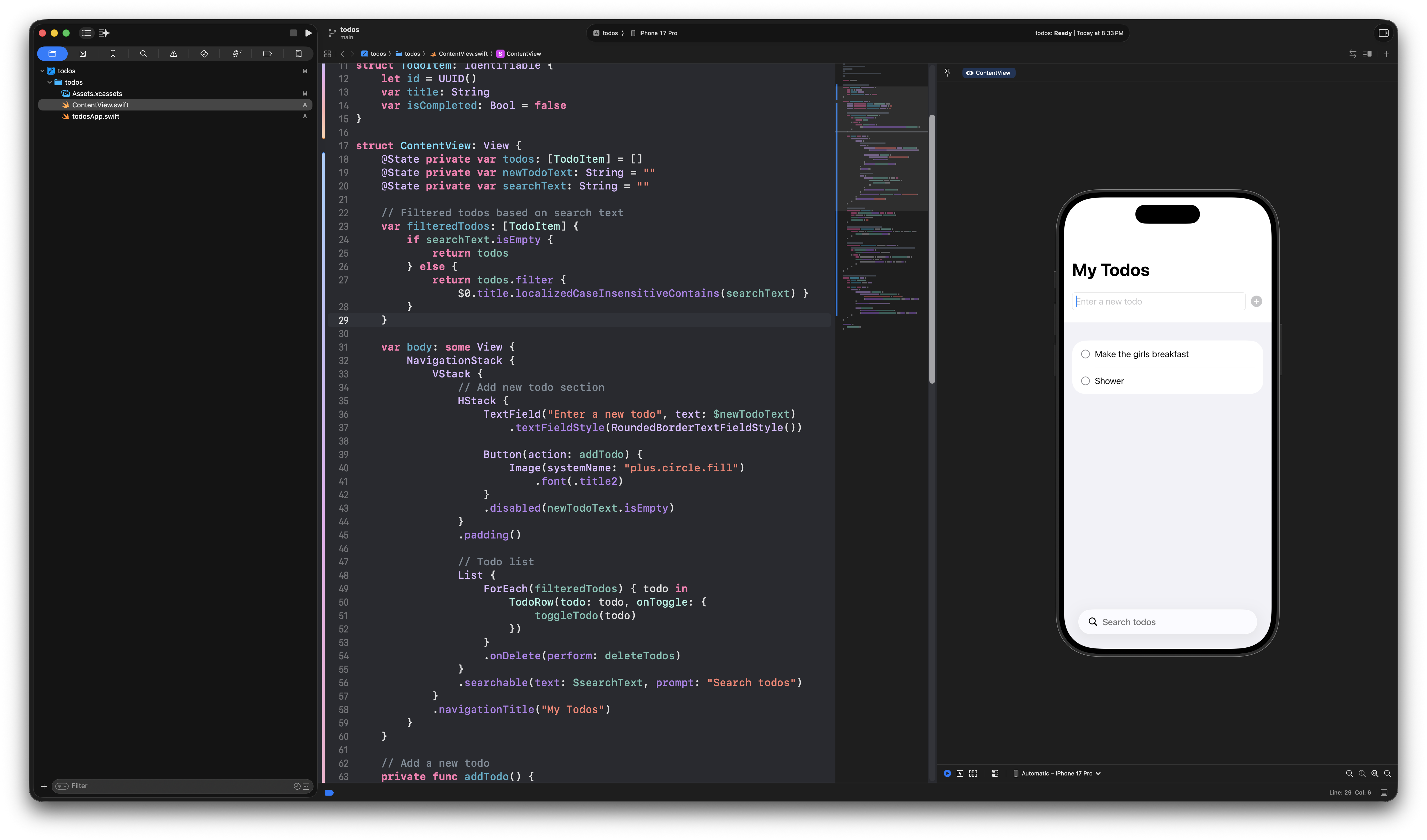
I opened Xcode, created a SwiftUI project, and prompted the built-in agent: I am new to iOS development, create me a simple to-do app where I can manage and search to-dos.
It produced a struct model and a SwiftUI content view. I could add to-dos, search them, mark them complete. Functionally, it worked. It did not give me a priority field, which I noticed only because I had asked for something similar on the Spring side.
Here is the honest part. I do not know enough about Swift to be critical of this code. On the Spring app, I dissected the database choice, the JPA abstraction, the error handling, the tests. On the iOS app, I have no idea about best practices. I do not know how offline storage should work, what the App Store will reject, or what a senior Swift developer would flag on sight.
What I know is that the code looks good and the app runs. That is all I have to judge it on. And that is exactly the problem. I cannot be critical of code I do not know.
What To Do About It
This feeling has a name in journalism. Gell-Mann amnesia is when you read a news article about a subject you know well, spot every error, then turn the page and trust the next article about a subject you do not know. AI coding tools trigger the exact same reflex.
So here is what I recommend when working with these agents.
Trust what you know, verify what you do not. When you use AI in a language, framework, or domain you do not know well, assume the output is wrong until you have verified it. Run it, read the docs, ask it to explain its own choices, then sanity check those explanations. The confidence you feel is not evidence of correctness. It is evidence of your own blind spot.
Use AI to learn, not just to ship. If you are learning something new like iOS, do not just accept the code. Ask why. Ask what the alternatives are. Ask what a senior developer in that ecosystem might flag. You are using the tool to build the fundamentals that will eventually let you critique it.
Master the fundamentals of your craft. Naming, refactoring, reading code, understanding systems. These are the skills that turn AI output into shipped software instead of technical debt. They matter more now, not less.
The Skill That Actually Matters
Code is cheap. Software is not. Anyone can generate code now. Building software that scales, stays secure, is observable, and survives maintenance is the hard part.
The future of this job is not about who types the fastest prompt. It is about who can tell when the answer is wrong. That is a skill you build one fundamental at a time.
So can you trust AI-generated code? It depends on your knowledge of that code base. Build that knowledge, and the tools become a force multiplier instead of a liability.
Happy Coding
Dan
Related Articles
Spec-Driven Development for Solo Developers: My Plan
Spec-driven development without the team process. The lightweight plan I use as a solo developer, from one PRODUCT.md to a retro, on a Spring Boot Stripe store.
Getting Started with Jev in Java and Spring Boot
Call TypeSafe Jev from Java and Spring Boot with RestClient. Build a complete support-ticket example with typed questions, Java records, and a mocked API test.
I Built My Own Content OS With Claude Code
How I built Content OS with Claude Code and Spring Boot to manage videos, blog posts, and newsletters, and what changes when you build software for one user.
subscribe.sh
$ subscribe --list weeklyish
Enjoyed this post? Get the next one.
Java, Spring, and what I'm learning — one email, weekly(ish). Unsubscribe anytime.