
We've all seen it. AI generates a UI and it looks like every other generic, bland interface out there. Or worse, it's flat-out ugly. The team behind Tailwind CSS and Refactoring UI noticed this too, and they built something to fix it. UI.sh is a collection of expertly crafted agent skills that give your AI coding tools the design expertise of a senior UI designer.
What Is UI.sh and Why Should You Care?
As a back-end developer, I'll be the first to admit that design is not my strong suit. I love the aesthetics of a good design, I can recognize one when I see it, but getting there on my own takes me way too long. I fiddle with spacing, second-guess color choices, and burn hours that should be spent on business logic.
UI.sh is a collection of task-oriented prompts and workflows, what they call "agent skills," for building UIs that don't suck. That's literally their tagline, and it lives up to it. These skills integrate directly into the AI coding tools you're already using, like Claude Code and OpenAI's Codex.
What makes this different from just asking ChatGPT to "make me a login page" is that these skills are backed by the design expertise of the Tailwind CSS team. You're essentially getting a senior designer's eye baked into your AI workflow.
The Skills Breakdown
This used to be a single skill that tried to handle everything, but the team recently broke it up into multiple focused skills. This is a change I'm really loving because each skill does one thing well.
Here are some of the highlights:
Design lets you build new UI with the expertise of a senior designer. This is your go-to for creating pages and components from scratch.
Ideas generates and compares multiple design directions right in the browser. When you're not sure which direction to go, this skill gives you options to choose from.
Brand Kit helps establish and maintain consistent branding across your project.
Componentize breaks down larger pieces of UI into reusable components.
Canonicalize cleans up your Tailwind CSS usage to follow best practices.
Dark Mode adds dark mode support to an existing app.
Responsive makes a website responsive if it isn't already.
Markup from Images turns screenshots or mockups into semantic markup.
We're not going to cover all of them today, but I'll walk through a couple that I think really showcase the power of these skills.
Getting Started
Right now, UI.sh is invite-only. You'll need to request an invite, and it is a paid product. I have no problem paying for this because the value is real, especially for developers like me who aren't design-focused.
Once you have access and you're signed in, you can install the skills using an NPX command. Your account will have a unique token that you'll need for installation. You can install skills individually or all at once. I went ahead and installed everything because I wanted the full toolkit available across all my projects.
The skills are installed locally, not tied to a single project, so they work across any project you're working on.
Example: Designing a Login Page
Let's start with the Design skill. The prompt is straightforward. In Claude Code, I typed:
/design create a login page for a SaaS application, include social logins for Google and GitHub
The skill starts by loading design guidelines and understanding the project structure. Since I ran this in an empty folder, it decided to build a standalone page. It loads the relevant design guidelines and works through what the page should include.
After a few moments of processing, it spun up a local server and opened the result in Chrome. The login page had everything I asked for: a clean layout with a company name, "Welcome back" heading, username and password fields, "Remember me" and "Forgot password" options, a sign-in button, and social login buttons for Google and GitHub. There was even a nice banner image on the side.
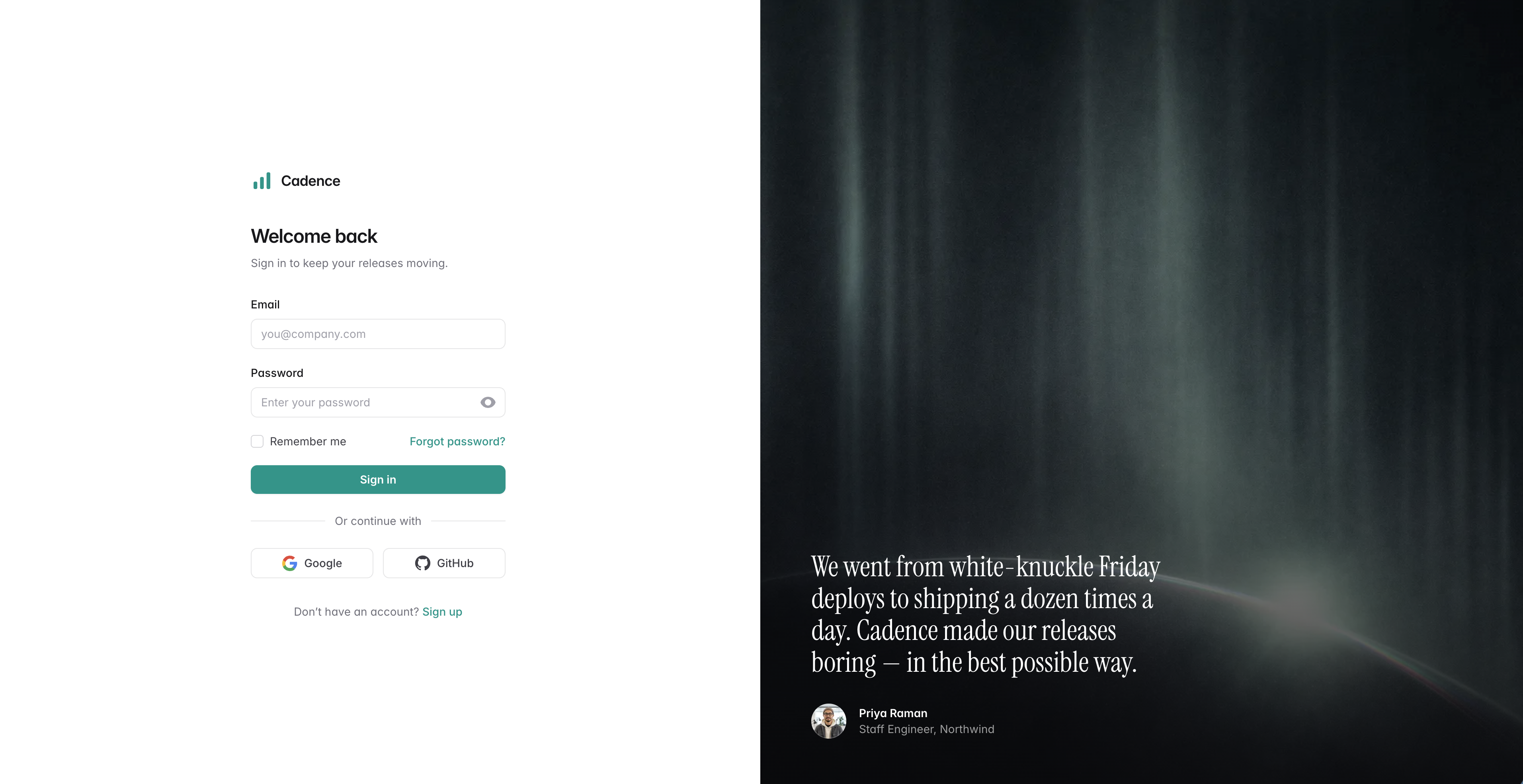
It didn't stop there. The skill automatically checked the page across breakpoints and verified both light and dark mode worked correctly. It even tested the show/hide password interaction.
Is this the final production-ready page? Probably not. But as a starting point, it's excellent. From here, I can iterate on the design or bring it into my framework of choice. For me, that means pulling it into a Spring project and converting it to whatever template engine I'm using.
Example: Generating Ideas for a Newsletter Signup
The Ideas skill is where things get really interesting. When you don't know which direction to take, this skill generates multiple design concepts so you can compare them side by side.
I ran this prompt:
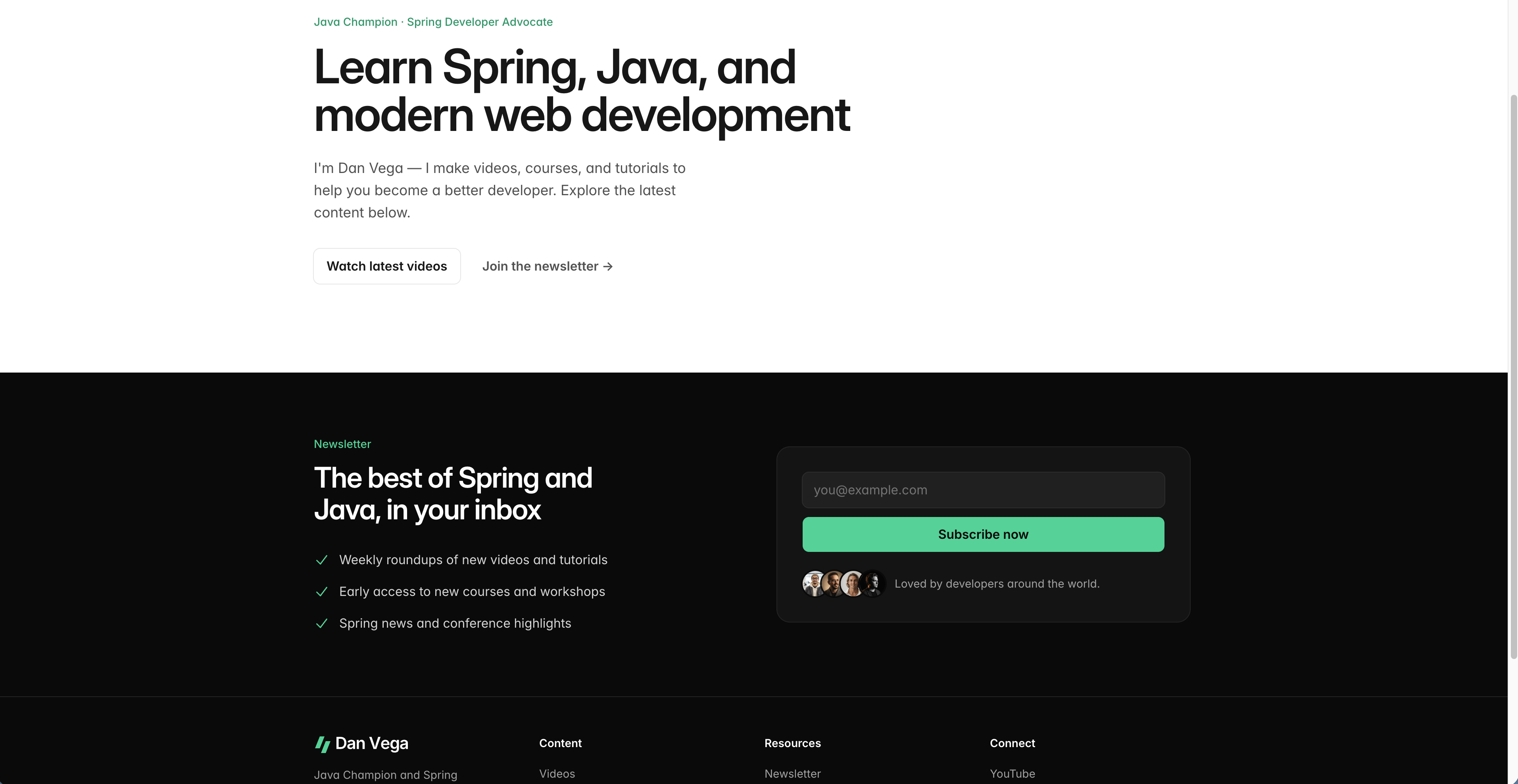
/design /ideas generate three newsletter signup form concepts for a homepage footer
Notice how you can combine skills. I'm using both /design and /ideas together. This tells the agent to design something fresh and give me multiple options.
The result was three distinct newsletter signup concepts, each with a different style. There was an inline row layout, a spotlight card, and an editorial style. Each one was rendered in the browser with a little switcher so I could flip between them.
The editorial style was my favorite, and I'm actually planning to add something like it to my personal site. The skill also tested each concept on mobile, verified responsive behavior, and checked light and dark mode for all three options.
Real-World Use: Refreshing My Personal Website
Here's where this got personal. I have a portfolio website built on a Tailwind CSS template from Tailwind UI. It looks good, but I wanted to freshen it up. Give it a new coat of paint.
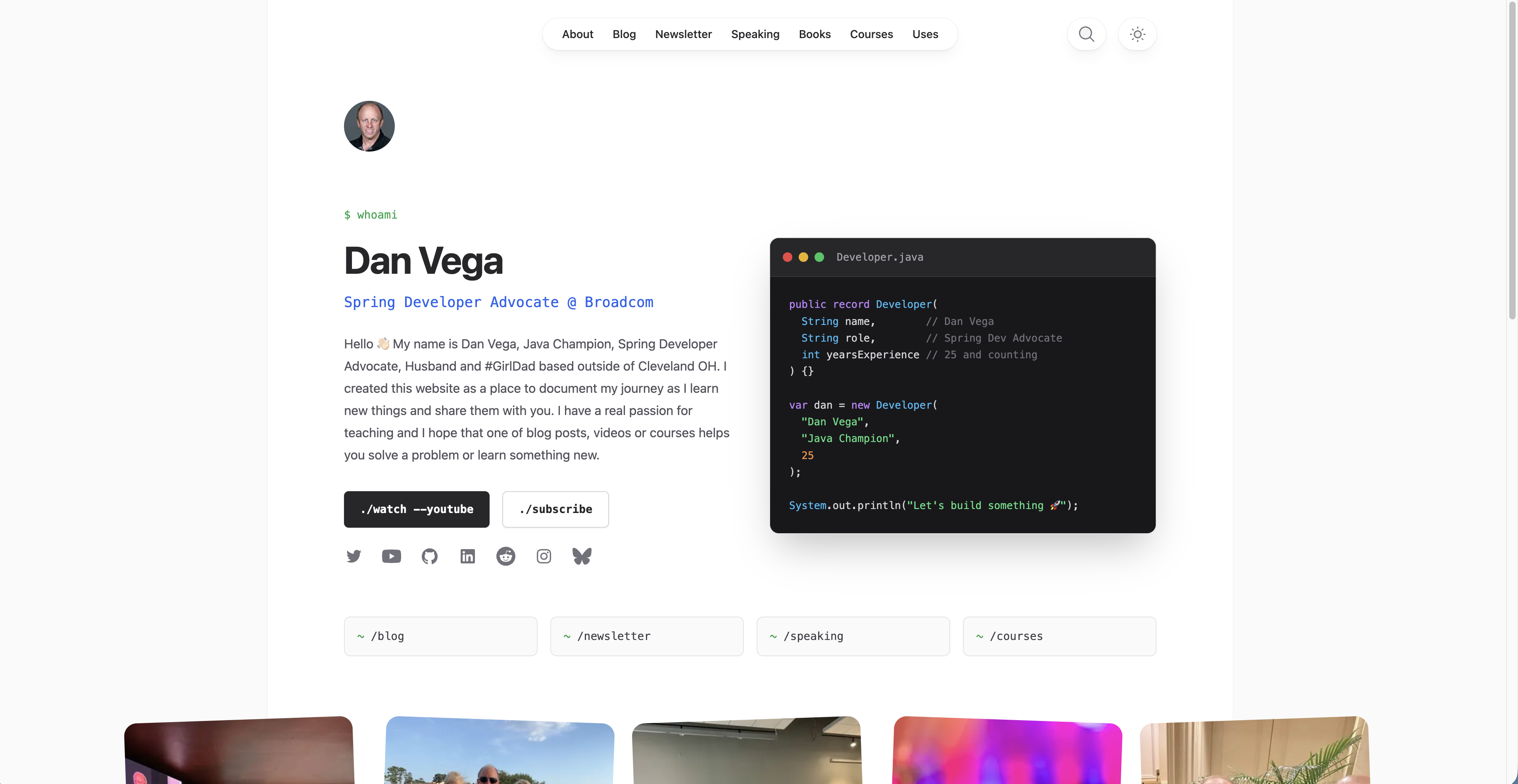
I opened my website project, ran /ideas, and asked for some new homepage concepts. After reviewing the options, I landed on one called "the terminal developer" theme, and it's honestly one of the coolest things I've seen generated.
The design included a code editor component on the page with an actual Java record:
public record Developer(String name, String role, int yearsOfExperience) {}
It created a new instance of that record and had the tagline "Let's build something new." The theme carried through to a terminal-style introduction section with a $ whoami prompt that printed out my name, title, and a short blurb. It included links to my YouTube channel, newsletter, socials, and other pages on the site.
That's exactly what I was looking for. Not a complete overhaul, just a fresh, creative take on the homepage. These are the kinds of design decisions that would take me hours of going back and forth, and the skill nailed it on the first try.
Why This Matters for Back-End Developers
If you're a front-end designer, you probably already know about tools like this. But if you're a back-end developer working with Spring, this is a real workflow improvement. Here's how I see the process:
- Use UI.sh skills to prototype and design your UI components
- The skills generate clean HTML with Tailwind CSS
- Bring that markup into your Spring project
- Convert it to your template engine (Thymeleaf, JTE, or whatever you prefer)
- Use AI-assisted development to help with the conversion if needed
The key insight is that you're not context-switching into a design tool. You stay in your coding environment, use the tools you already know, and get professional-quality design output.
Wrapping Up
UI.sh fills a gap I didn't know how to fill before. I always appreciated good design but didn't have the expertise to produce it efficiently. These agent skills give me access to the design knowledge of the Tailwind CSS team, right inside the tools I already use every day.
The combination of /ideas for exploration and /design for execution is a workflow that makes a lot of sense. Start broad, pick a direction, then iterate. It's how professional designers work, and now I can do it too without leaving Claude Code.
If you want to learn more, head over to UI.sh to request an invite. And if you're a back-end developer who has been struggling with the front-end side of things, I think you'll find this as exciting as I do.
Happy Coding!
Related Articles
Spec-Driven Development for Solo Developers: My Plan
Spec-driven development without the team process. The lightweight plan I use as a solo developer, from one PRODUCT.md to a retro, on a Spring Boot Stripe store.
Claude Code Skills for Podcast Automation
Use Claude Code skills for podcast automation: edit audio, create show notes, prepare a Transistor upload, and open a spring.io PR after the episode is live.
Getting Started with Jev in Java and Spring Boot
Call TypeSafe Jev from Java and Spring Boot with RestClient. Build a complete support-ticket example with typed questions, Java records, and a mocked API test.
subscribe.sh
$ subscribe --list weeklyish
Enjoyed this post? Get the next one.
Java, Spring, and what I'm learning — one email, weekly(ish). Unsubscribe anytime.