
I just finished putting together a full course on building GraphQL APIs with Spring Boot, and I'm really excited to share it with you. The project is built with the absolute latest and greatest: Java 26 and Spring Boot 4.0.4.
If you've ever been frustrated by bloated REST responses, too many endpoints, or making five API calls to load a single screen, GraphQL might be exactly what you're looking for. In this post I'll walk you through why GraphQL is worth your attention, and then we'll dig into the code from the course project.
Why GraphQL?
First, let's address the elephant in the room: you shouldn't just learn something to put it on your resume. Avoid resume-driven development! However, GraphQL solves some very specific pain points you may have encountered while building traditional REST APIs:
No More Over-Fetching. REST endpoints often return a massive payload of data when you only need a couple of fields. GraphQL allows the client to request exactly what it needs.
Fewer Round Trips. Instead of hitting four different endpoints to populate a single UI screen, a single GraphQL query can fetch data from multiple resources at once.
Eliminating Endpoint Sprawl. Say goodbye to /users/{id}, /users/{id}/posts, and complex versioning strategies (/v1, /v2). GraphQL gives you a single endpoint that handles all data requests.
Built-in Documentation. Because GraphQL relies on a strongly-typed schema, you get built-in, living documentation. Tools like the GraphiQL explorer let you introspect and test the API right out of the box.
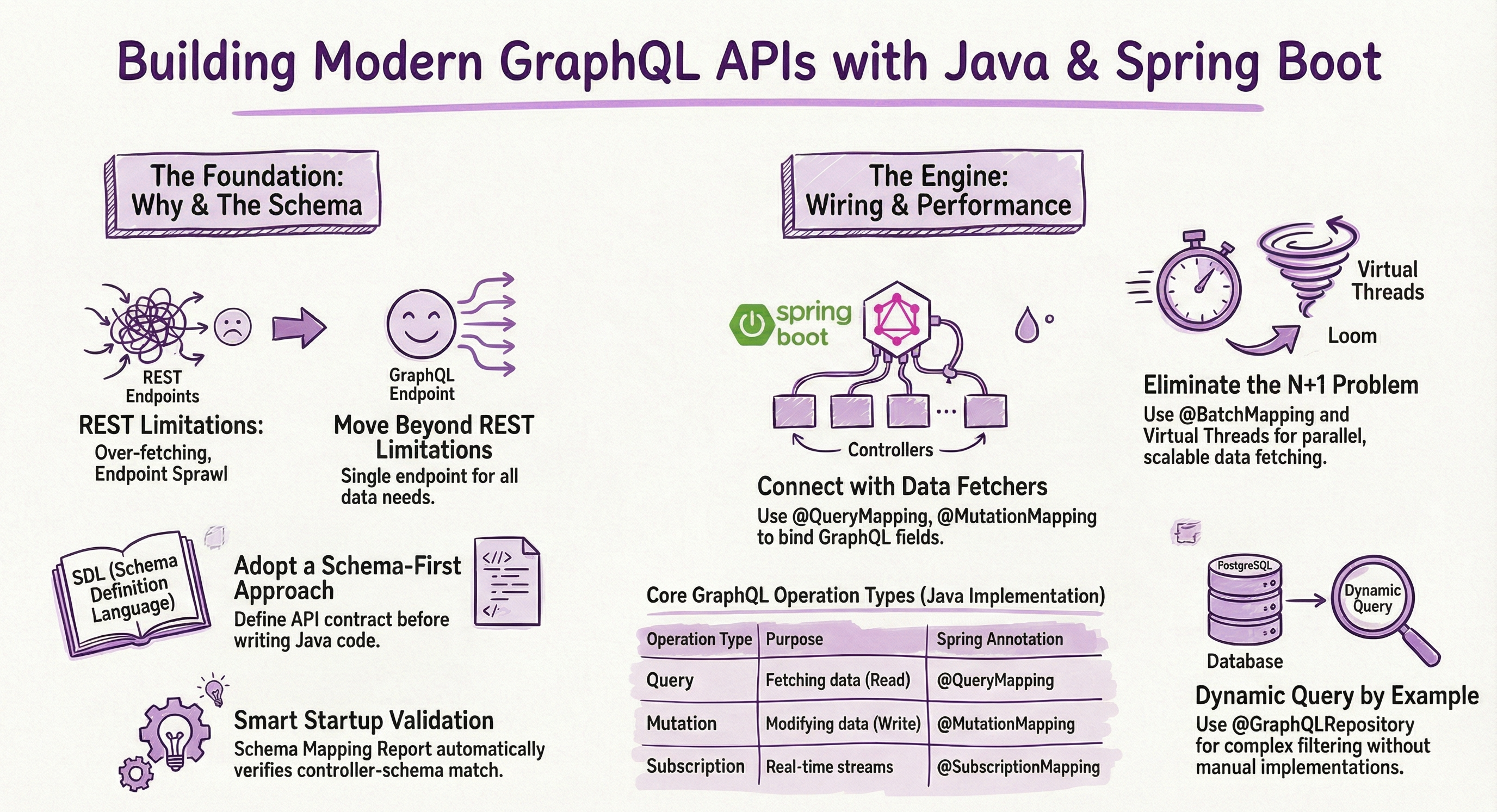
The Project: GraphQL Books
Throughout the course we build an application that manages a library of books, authors, and reviews. To get up and running quickly without installing external databases manually, we use Docker Compose to spin up a PostgreSQL database and a Zipkin instance for tracing.
Here is the compose.yaml that powers local development:
services:
  postgres:
    image: 'postgres:latest'
    environment:
      - 'POSTGRES_DB=books'
      - 'POSTGRES_PASSWORD=password'
      - 'POSTGRES_USER=admin'
    ports:
      - '5432:5432'
  zipkin:
    image: 'openzipkin/zipkin:latest'
    ports:
      - '9411:9411'
Spring Boot's Docker Compose module automatically starts these containers when you run the application. No manual setup required.
1. Schema-First Development
Unlike REST APIs where the contract is often an afterthought, GraphQL promotes a schema-first approach. We define our API contract upfront using the Schema Definition Language (SDL). This ensures both frontend and backend teams are aligned before any implementation begins.
Here is part of the schema from the project:
type Query {
    books: [Book!]!
    book(id: Int!): Book!
    authors: [Author!]!
    search(text: String) : [SearchItem!]!
}

type Mutation {
    addBook(bookInput: BookInput): Book!
}

type Book {
    id: ID!
    title: String!
    author: Author!
}

type Author {
    id: ID!
    name: String!
    books: [Book!]!
}

input BookInput {
    title: String!
    authorId: Int!
}

union SearchItem = Author | Book
There is a lot going on here, and we build this up step by step in the course. The key things to notice are the Query and Mutation operation types that define what clients can ask for, the input types used for passing structured arguments, and the union type for polymorphic search results.
Spring for GraphQL also provides a brilliant Schema Mapping Inspection Report at startup. This validates your Java code against your schema, making sure you don't have any unmapped fields or missing data fetchers. If something is out of sync, you'll see it right in your console output before a single request hits the server.
2. Data Fetchers (Controllers)
To tie our GraphQL schema to our Java code, we create Controllers. Using annotations like @QueryMapping and @MutationMapping, we map our backend logic to the operations defined in our schema. Here is the BookController:
@Controller
public class BookController {

    private final BookRepository bookRepository;
    private final AuthorRepository authorRepository;

    public BookController(BookRepository bookRepository, AuthorRepository authorRepository) {
        this.bookRepository = bookRepository;
        this.authorRepository = authorRepository;
    }

    @QueryMapping
    public List<Book> books() {
        return bookRepository.findAll();
    }

    @QueryMapping
    public Optional<Book> book(@Argument Long id) {
        return bookRepository.findById(id);
    }

    @MutationMapping
    public Book addBook(@Argument BookInput bookInput) {
        var author = authorRepository.findById(bookInput.authorId());
        var book = new Book();
        book.setTitle(bookInput.title());
        book.setAuthor(author.orElseThrow());
        return bookRepository.save(book);
    }
}
The @QueryMapping annotation is shorthand for @SchemaMapping(typeName = "Query"). Spring automatically matches the method name to the corresponding field in the schema. The @Argument annotation binds the incoming GraphQL arguments to your method parameters.
For the mutation, we use an Input Type to group the fields needed to create a book. On the Java side, this is a simple record:
public record BookInput(String title, Long authorId) {
}
Records are a perfect fit for GraphQL input types. They're immutable, concise, and Spring for GraphQL can automatically bind the incoming arguments to the record's constructor.
With the GraphiQL UI enabled, you can test these operations interactively:
# Find all books with their authors
query {
  books {
    id
    title
    author {
      name
    }
  }
}

# Find a specific book using variables
query findBookById($id: Int!) {
  book(id: $id) {
    id
    title
    author {
      id
      name
    }
  }
}

# Add a new book
mutation {
  addBook(bookInput: {title: "new book", authorId: 1}) {
    id
    title
  }
}
3. Solving the N+1 Problem with Batch Loading
Performance is critical. If we request a list of authors and then independently fetch the books for each author, we run into the classic N+1 query problem. In the course, we start by showing the naive approach so you can see the problem firsthand:
@SchemaMapping
public List<Book> books(Author author) throws InterruptedException {
    log.info("Retrieving books for author " + author.getName());
    return bookRepository.findByAuthor(author);
}
If you have 6 authors, this method fires 6 separate queries. You can watch the SQL statements pile up in the console with spring.jpa.show-sql=true. The fix is the @BatchMapping annotation, which groups all of these requests into a single database call:
@BatchMapping
public List<List<Book>> books(List<Author> authors) {
    log.info("Batch loading books for {} authors", authors.size());

    List<Long> authorIds = authors.stream()
            .map(Author::getId)
            .toList();

    List<Book> allBooks = bookRepository.findByAuthorIdIn(authorIds);

    Map<Long, List<Book>> booksByAuthorId = allBooks.stream()
            .collect(Collectors.groupingBy(book -> book.getAuthor().getId()));

    return authors.stream()
            .map(author -> booksByAuthorId.getOrDefault(author.getId(), Collections.emptyList()))
            .toList();
}
The method signature tells you everything. Spring passes in the full list of Author objects that need their books field resolved, and you return a List<List<Book>> where the order matches the input list. One query. Done.
To make it even more scalable, you can enable Virtual Threads so data fetching happens in parallel instead of sequentially on the same Tomcat thread. It's a one-liner in your configuration:
spring:
  threads:
    virtual:
      enabled: true
4. Advanced Search with Unions
What if a user searches a keyword, and you want to return either a Book or an Author? GraphQL Unions make this possible. In the schema we define:
union SearchItem = Author | Book
And then implement a SearchController that returns polymorphic results:
@Controller
public class SearchController {

    private static final Logger log = LoggerFactory.getLogger(SearchController.class);
    private final BookRepository bookRepository;
    private final AuthorRepository authorRepository;

    public SearchController(BookRepository bookRepository, AuthorRepository authorRepository) {
        this.bookRepository = bookRepository;
        this.authorRepository = authorRepository;
    }

    @QueryMapping
    List<Object> search(@Argument String text) {
        log.debug("Searching for '" + text + "'");
        List<Object> results = new ArrayList<>();
        results.addAll(authorRepository.findAllByNameContainsIgnoreCase(text));
        results.addAll(bookRepository.findAllByTitleContainsIgnoreCase(text));
        return results;
    }
}
The return type is List<Object> because the results can be either Author or Book instances. Spring for GraphQL handles the type resolution automatically since both classes live in the same package as the schema types they represent. Clients can then use inline fragments to request type-specific fields:
query {
  search(text: "Spring") {
    ... on Book {
      title
    }
    ... on Author {
      name
    }
  }
}
5. Query By Example and @GraphQlRepository
Implementing flexible search functionality can get complex fast. Consider a review system where users might want to filter by rating, by reviewer name, by verification status, or any combination of those. Traditionally, you'd end up writing a separate repository method for every permutation.
Spring for GraphQL solves this with @GraphQlRepository and Query by Example:
@GraphQlRepository
public interface ReviewRepository extends JpaRepository<Review, Long>, QueryByExampleExecutor<Review> {
}
That's the entire repository. The @GraphQlRepository annotation automatically creates data fetchers for the queries in your schema that match this type. Combined with QueryByExampleExecutor, clients can dynamically filter data without you writing any extra controller code.
On the schema side, we define a ReviewFilter input type:
input ReviewFilter {
    rating: Int
    verified: Boolean
    reviewerName: String
}
And a matching Java record:
public record ReviewFilter(
        Integer rating,
        Boolean verified,
        String reviewerName
) {}
Clients can now send queries like these, and the filtering just works:
# Find only verified reviews
{
  reviews(filter: { verified: true }) {
    reviewerName
    rating
    comment
  }
}

# Find reviews by a specific reviewer
{
  reviews(filter: { reviewerName: "Sarah Chen" }) {
    book {
      title
    }
    rating
    comment
  }
}
The fields in the filter are all nullable, so clients can include or omit any combination they want.
6. Spring Data AOT Repositories
Spring Boot 4 introduces Spring Data AOT (Ahead-of-Time) compilation. By adding the process-aot goal to the Maven plugin, we move repository query processing from runtime to build time. Instead of parsing derived query method names on every startup, the AOT processor pre-generates SQL statements and repository implementations during the build.
The project already has this configured in the pom.xml:
<plugin>
    <groupId>org.springframework.boot</groupId>
    <artifactId>spring-boot-maven-plugin</artifactId>
    <executions>
        <execution>
            <id>process-aot</id>
            <goals>
                <goal>process-aot</goal>
            </goals>
        </execution>
    </executions>
</plugin>
This gives you faster startup (the Spring team cites 50-70% improvement), build-time error detection for typos in method names like findByNamme, lower memory usage, and inspectable generated SQL implementations in target/. Repositories in this project like BookRepository and AuthorRepository both use derived query methods that benefit from AOT processing:
public interface BookRepository extends JpaRepository<Book, Long> {

    @Override
    @EntityGraph(attributePaths = "author")
    List<Book> findAll();

    List<Book> findAllByTitleContainsIgnoreCase(String title);

    List<Book> findByAuthorIdIn(List<Long> authorIds);
}
7. Client App Integration
We don't just build the server. We also look at how to consume a GraphQL API from a Java application. The ClientApp is a standalone Spring Boot application (with WebApplicationType.NONE) that demonstrates Spring's native HttpSyncGraphQlClient:
@Import(RestClientAutoConfiguration.class)
public class ClientApp implements ApplicationRunner {

    private static final Logger log = LoggerFactory.getLogger(ClientApp.class);
    private final HttpSyncGraphQlClient client;

    public ClientApp(RestClient.Builder builder) {
        RestClient restClient = builder.baseUrl("http://localhost:8080/graphql").build();
        this.client = HttpSyncGraphQlClient.builder(restClient).build();
    }

    public static void main(String[] args) {
        new SpringApplicationBuilder(ClientApp.class).web(WebApplicationType.NONE).run(args);
    }

    @Override
    public void run(ApplicationArguments args) throws Exception {
        var document = """
                query findBookById($id: Int!) {
                    book(id: $id) {
                        id
                        title
                        author {
                            id
                            name
                        }
                    }
                }
                """;
        var book = client.document(document)
                .variable("id", 1L)
                .retrieveSync("book")
                .toEntity(Book.class);
        log.info("Book: {}", book);
    }
}
The client is built on top of RestClient, so there are no reactive dependencies required. You define your GraphQL query as a string, bind variables with type-safe methods, and deserialize the response directly into your entity class. The .toEntity(Book.class) call handles the nested author field automatically.
8. Observability
Because GraphQL APIs can fan out data fetching across databases, caches, and external services, observability is incredibly important. This project includes the Micrometer tracing bridge and Zipkin reporter as dependencies, and the application config sets the sampling probability to 100%:
management:
  tracing:
    sampling:
      probability: 1.0
Spring for GraphQL has built-in instrumentation based on the Micrometer Observation API. This means every GraphQL request and every non-trivial data fetcher gets traced automatically. You can open Grafan at http://localhost:3000 and see exactly how a GraphQL query fans out across your data fetchers, which ones are slow, and where the bottlenecks are.
9. Testing
The project also includes a full test suite using Spring for GraphQL's GraphQlTester. Here is an example that tests the mutation for adding a new book:
@SpringBootTest
@Transactional
class BookControllerTests {

    private final GraphQlTester graphQlTester;

    @Autowired
    BookControllerTests(ExecutionGraphQlService graphQlService) {
        this.graphQlTester = ExecutionGraphQlServiceTester.builder(graphQlService).build();
    }

    @Test
    void shouldAddNewBook() {
        var document = """
        mutation($input: BookInput!) {
            addBook(bookInput: $input) {
                id
                title
                author {
                    id
                    name
                }
            }
        }
        """;
        Map<String, Object> input = Map.of(
                "title", "New Book",
                "authorId", 1
        );

        graphQlTester.document(document)
                .variable("input", input)
                .execute()
                .path("addBook")
                .entity(Book.class)
                .satisfies(book -> {
                    assertThat(book.getTitle()).isEqualTo("New Book");
                    assertThat(book.getAuthor()).isNotNull();
                });
    }
}
The ExecutionGraphQlServiceTester executes queries against the full GraphQL engine without starting an HTTP server, which makes tests fast and focused. The project uses Testcontainers for PostgreSQL during tests so your test data is isolated and repeatable.
Next Steps
You can find the entire video course for free on my YouTube channel, and all the source code for this project is available in the danvega/graphql-books GitHub Repository.
Don't just ask AI to build it. Pull down the repository, write the code, and explore what Spring for GraphQL has to offer. If you found this helpful, please leave a comment, give the videos a thumbs up, and subscribe to the channel!
Happy coding!
Related Articles
Spring Boot 3 to 4 Migration: Fixing Every Break
A hands-on Spring Boot 3 to 4 migration: upgrade a real app, then fix Jackson 3, modular starters, the missing H2 console, test imports, and JSpecify.
Spec-Driven Development for Solo Developers: My Plan
Spec-driven development without the team process. The lightweight plan I use as a solo developer, from one PRODUCT.md to a retro, on a Spring Boot Stripe store.
Spring AI TypeSafe: Build a Model Router From Scratch
Learn Spring AI TypeSafe by building a model router from an empty app. One Choice question to Jev picks the cheapest OpenAI model tier for every prompt.
subscribe.sh
$ subscribe --list weeklyish
Enjoyed this post? Get the next one.
Java, Spring, and what I'm learning — one email, weekly(ish). Unsubscribe anytime.