
If you've been spending more time in the terminal lately (thanks to tools like Claude Code), you've probably felt the friction of switching to a browser just to bootstrap a new Spring project. I kept bouncing between the Spring Initializr website, my downloads folder, my IDE, and then back to the terminal to start coding. That workflow had too many steps, and I wanted to fix it.
So when I spotted a tweet announcing Tambu UI, a brand-new open source Terminal UI (TUI) framework for Java, I knew exactly what I wanted to build: a full terminal interface for the Spring Initializr that lets me create, configure, and open Spring projects without ever leaving the command line.
📦 Get the Code
Follow along with the complete working example.
The Workflow Problem
Here's what my project creation process used to look like:
- Open a browser and navigate to start.spring.io
- Fill in metadata, select dependencies, choose build tool and Java version
- Download the zip file
- Navigate to my downloads folder and unzip it
- Open the project in IntelliJ IDEA
- Open a terminal in that directory
- Start Claude Code
That's seven steps just to get to the point where I can actually start building something. And since I'm already in the terminal running Claude Code, it felt silly to leave the terminal just to create the project in the first place.
What I really wanted was a single command that would let me configure a Spring Boot project, generate it, open it in my IDE, and kick off Claude Code, all from the terminal.
Discovering Tambu UI
Tambu UI is a new open source TUI framework for the Java ecosystem created by Max Anderson. If you've seen tools like Lazygit or other modern terminal applications with rich interactive interfaces, that's exactly the kind of experience Tambu UI enables you to build with Java.
The framework gives you components for building interactive terminal layouts with navigation, text input, selection lists, file viewers, and more. The announcement blog post has a great trailer video and demos you can try out using JBang.
What caught my attention is that it combines two things I love: Java and working in the terminal. I was on a flight home from Dallas when I saw the announcement, fired up Claude Code on my phone, and started iterating on ideas right there.
How the Spring Initializr TUI Works
One important thing to understand is that I didn't rewrite the Spring Initializr logic. The Spring Initializr already exposes an API endpoint that the web UI, your IDE plugins, and other tools all use to generate projects. My TUI is just another client for that same API. This is the same approach I used when I built a Raycast extension (https://www.raycast.com/) for the Spring Initializr a while back.
Running the TUI
I built the project as a GraalVM native executable, which gives you fast startup time and low memory usage. Those two qualities matter a lot for a command-line tool since you don't want to wait several seconds for a JVM to warm up every time you create a project.
I created an alias called spring that points to the native executable, so getting started is as simple as:
spring
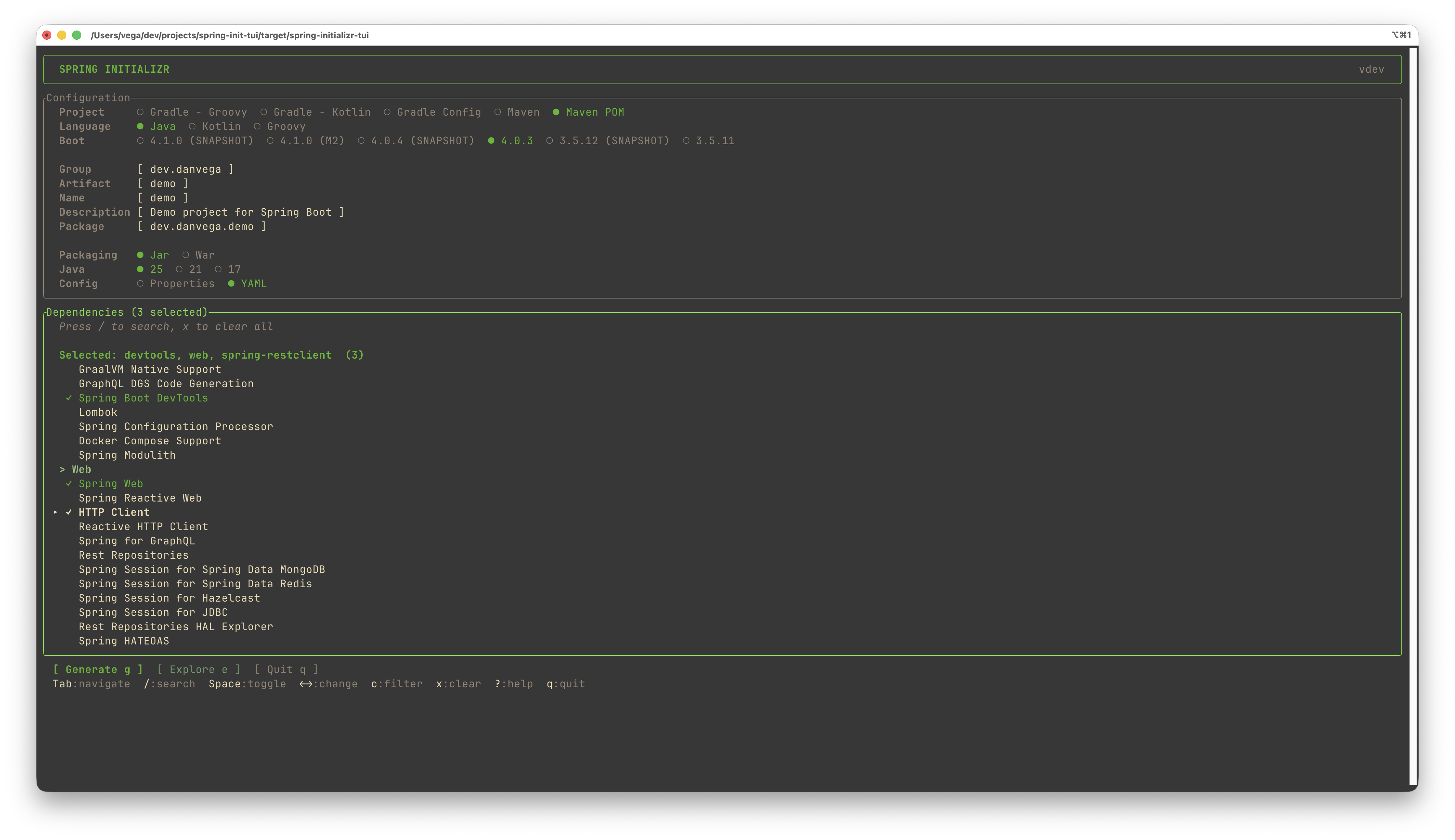
You'll see a splash screen followed by the main TUI interface. From there, you have access to the full project configuration screen where you can set all the same options you'd find on start.spring.io.
Configuration and Preferences
The TUI stores your preferences in a configuration file located in your home directory under .spring-initializr.
Just like the web version of the Spring Initializr, it remembers your last selections. If your previous project used
Maven, Java 25, Spring Boot 4.0.3, and YAML configuration, those will be pre-selected the next time you open it.
This is a small detail that makes a big difference when you're creating multiple projects throughout the week with similar settings.
Dependency Selection
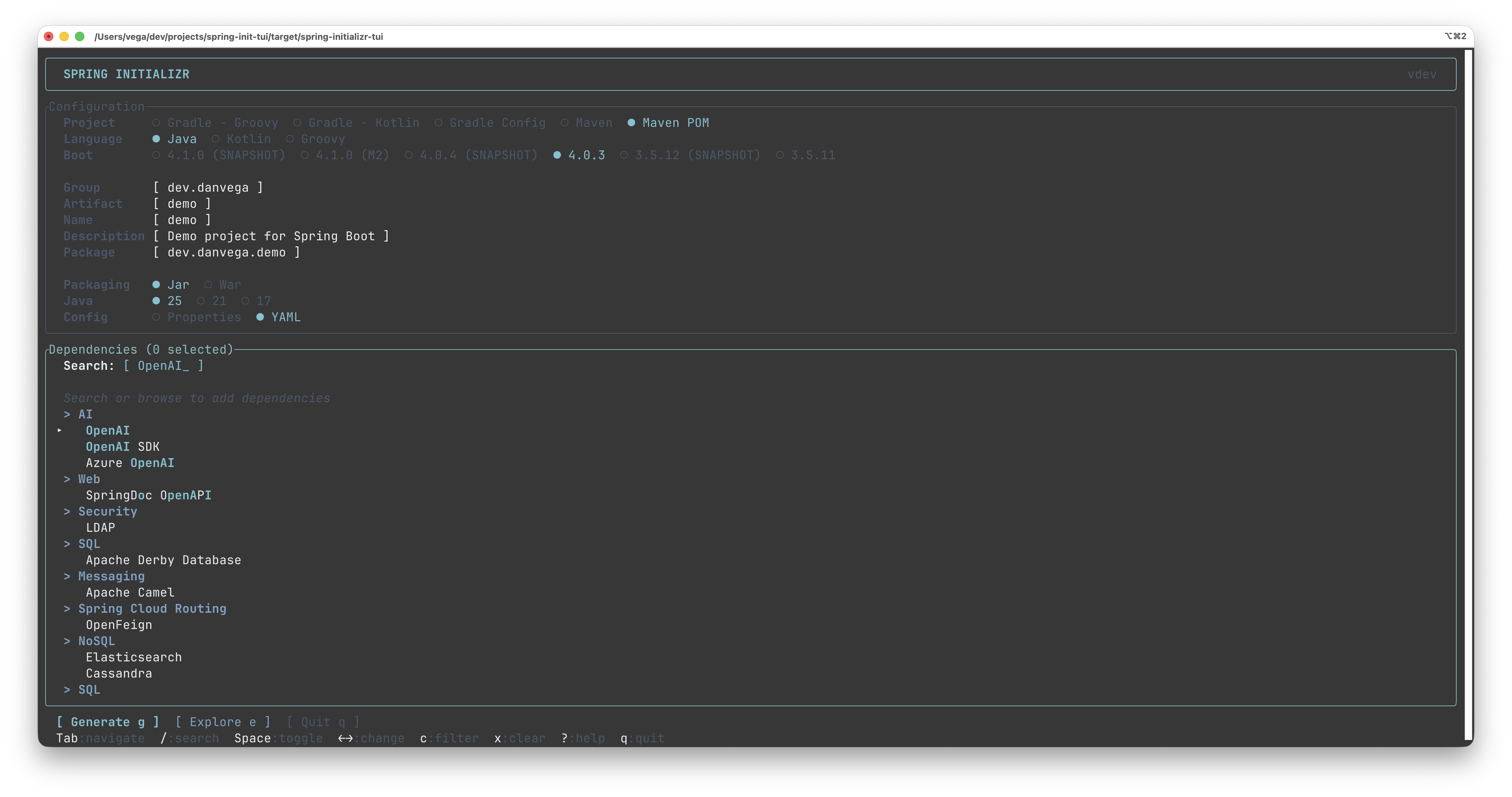
The dependency picker is where I spent a lot of time getting the experience right. You can browse through dependencies and toggle them on and off with the Enter key. But the real power comes from the search and filtering features.
Fuzzy search lets you find dependencies without typing the full name. Want Spring Web? You can type s web and it will match. Looking for the HTTP client? Just start typing and it narrows down the list.
Favorites keep track of dependencies you use often so you can quickly select your go-to stack without scrolling through the entire catalog.
Category filtering lets you jump between dependency categories. Press C and start typing a category name like "AI" to jump straight to AI-related dependencies.
You can also press X to clear all selected dependencies and start fresh.
Exploring the Build Before Generating
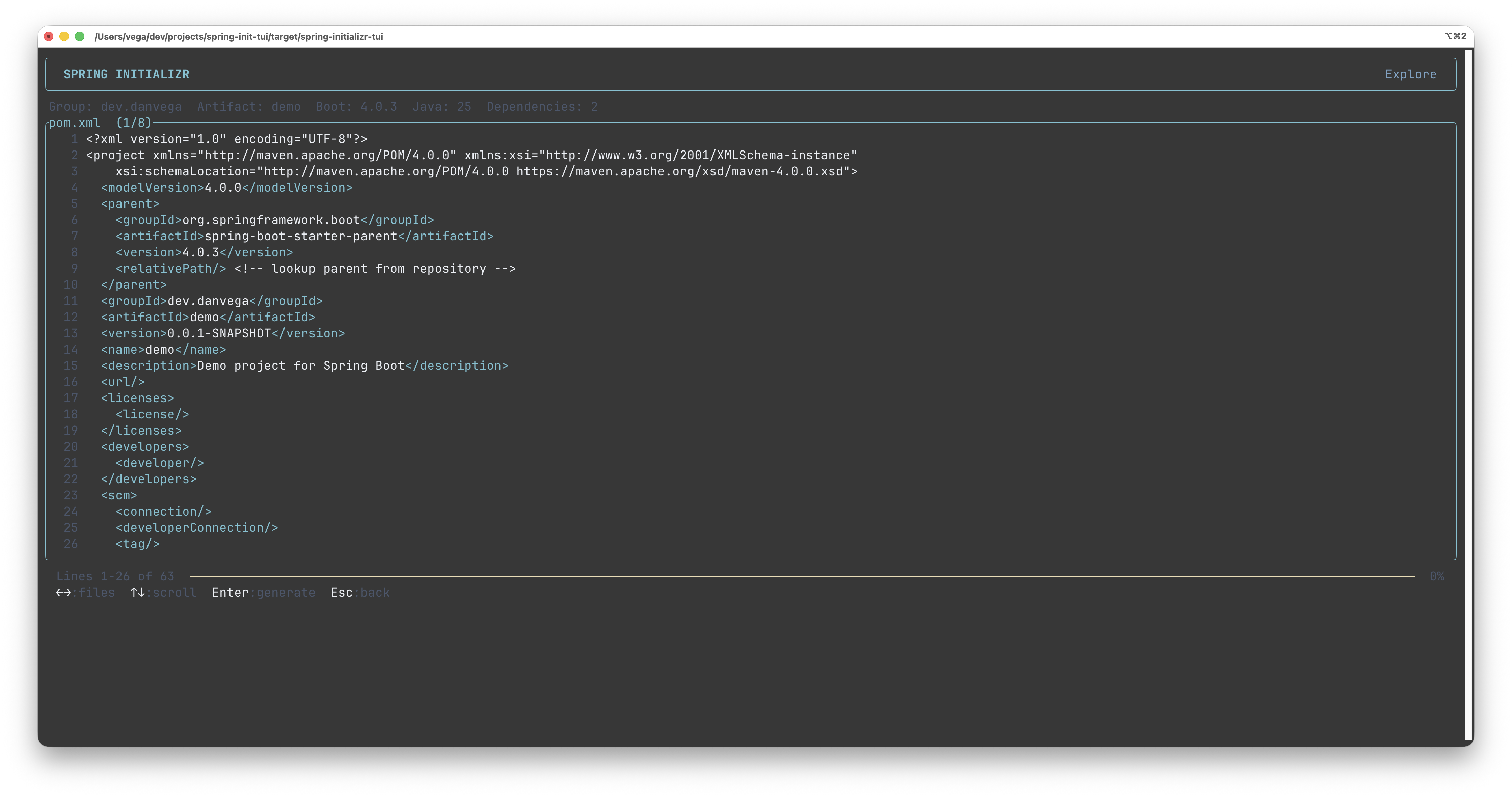
One feature I'm particularly happy with is the build explorer. Before you generate your project, you can preview
exactly what you're going to get. The explorer opens a file viewer that defaults to your build file (pom.xml for
Maven or build.gradle for Gradle).
As you scroll through the file, there's a visual progress indicator showing how far you are through the content. You can tab through all the generated files to review the project structure, the main application class, configuration files, and anything else the Initializr produces.
This gives you a chance to catch mistakes before you commit to generating the project. Did you forget a dependency? Escape back out and add it.
Generating and Opening Your Project
When you're ready, the generate action downloads and extracts the project to your current working directory. It creates a properly named folder based on your project's artifact ID.
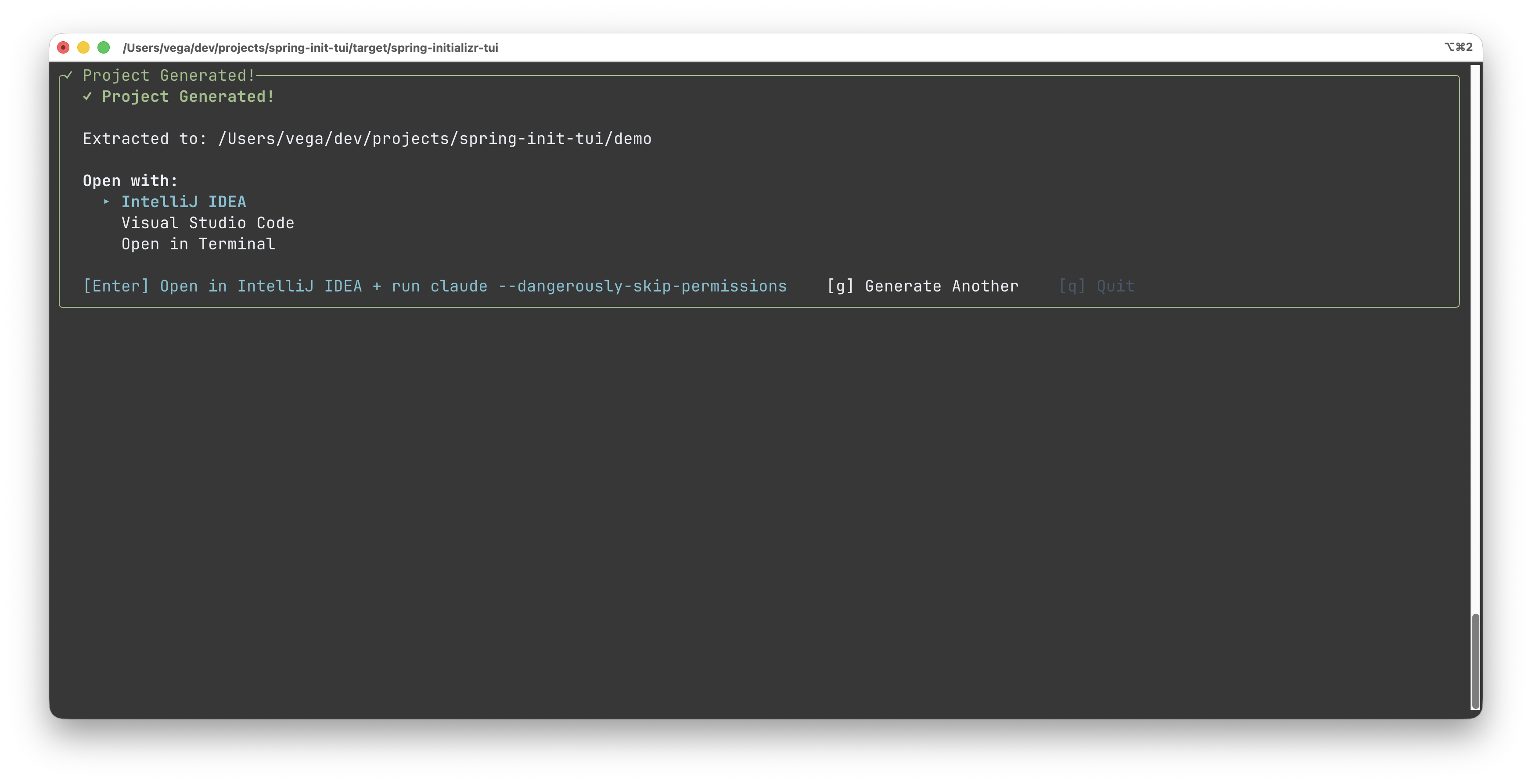
The TUI detects supported IDEs and editors on your system and lets you open the project directly. Currently supported editors include:
- IntelliJ IDEA
- Visual Studio Code
- Cursor
- Eclipse with Spring Tool Suite
- NetBeans
After selecting your editor, you have one more trick up your sleeve: post-generation hooks.
Post-Generation Hooks
This is the feature that ties the whole workflow together. In your .spring-initializr configuration file, you can
define a command to run after project generation completes. For me, that command launches Claude Code in the new
project directory.
{
  "postGenerateCommand" : "claude --dangerously-skip-permissions",
  "theme" : "nord"
}
So when I hit Enter to generate, three things happen in rapid succession:
- The project is extracted to my downloads directory
- IntelliJ IDEA opens with the new project
- Claude Code starts up in that same project directory
My seven-step workflow is now one command. I type spring, configure my project, hit generate, and I'm ready to start building.
Building It as a Native Image
The project uses JDK 25 and GraalVM to produce native executables. If you want to build from source, you'll need GraalVM installed, and you can create the native image using Maven:
./mvnw -Pnative native:compile
If you'd rather not build from source, I've set up GitHub Actions workflows that automatically create platform-specific binaries whenever I tag a release. Head over to the releases page and you'll find pre-built binaries for:
- macOS (ARM64)
- Windows (EXE)
- Linux (x86_64)
Download the zip for your platform, extract it, and you're good to go. All setup instructions are in the README.
What's Next
This project started as a personal tool to scratch an itch, but there are some features I'd love to add:
Bookmarks would let you save your favorite project configurations. The Spring Initializr web UI already has this concept, and bringing it to the TUI would save even more time for developers who frequently spin up similar projects.
Templates could go a step further. Imagine having a Markdown file in your configuration directory that defines not just the dependencies and metadata, but also starter configuration values. For an AI project, the template might include your API keys configuration. For an MCP server, it might include the boilerplate setup you always need. Templates would let you go from zero to a fully configured project in seconds.
The sky really is the limit when you're building tools for yourself, and that's what makes this such a fun time to be a developer.
We Live in a Great Time to Build
What I find most exciting about this project isn't the TUI itself. It's the fact that I went from seeing a tweet, to iterating on ideas on my phone during a flight, to having a working tool the next morning. We live in such an incredible time when if something bugs you about your workflow, you can just go build a solution. Your time and bandwidth are no longer roadblocks!
If you try the Spring Initializr TUI, I'd love to hear your feedback. Star the repository, open issues with feature requests, or just let me know if it helps your workflow the way it's helped mine.
Happy Coding!
Related Articles
Spring Boot 3 to 4 Migration: Fixing Every Break
A hands-on Spring Boot 3 to 4 migration: upgrade a real app, then fix Jackson 3, modular starters, the missing H2 console, test imports, and JSpecify.
Spec-Driven Development for Solo Developers: My Plan
Spec-driven development without the team process. The lightweight plan I use as a solo developer, from one PRODUCT.md to a retro, on a Spring Boot Stripe store.
Spring AI TypeSafe: Build a Model Router From Scratch
Learn Spring AI TypeSafe by building a model router from an empty app. One Choice question to Jev picks the cheapest OpenAI model tier for every prompt.
subscribe.sh
$ subscribe --list weeklyish
Enjoyed this post? Get the next one.
Java, Spring, and what I'm learning — one email, weekly(ish). Unsubscribe anytime.